
SAP movement types: the stamp every ingredient gets each time it crosses the fridge door
What SAP movement types are, and why codes like 261, 101, and 311 matter in the PP production process — explained through the flow of ingredients in a restaurant kitchen.
Hi, this is Rabbit! 🐰
In the previous post, we looked at T-codes like MB51 for checking inventory history and MIGO for moving inventory. But behind every one of these inventory movements is a hidden main character: the movement type.
Today, let’s cover what a movement type actually is, and how it records the flow of inventory during the production (PP) process.
- A movement type is a 3-digit numeric code that tells you “why and how” inventory moved.
- It’s easiest to remember in ranges: the 100s mean goods receipt, the 200s mean goods issue, the 300s mean transfers, and the 500s cover special cases.
- Because it’s the record of every single inventory change, it’s the foundation for accurate cost calculation and inventory management.
What exactly is a movement type
A movement type is a 3-digit numeric code that defines how inventory moves — physically or logically — inside the SAP system. Whether ingredients arrived at the warehouse (goods receipt), left for the kitchen (goods issue), or just shifted location within the warehouse, every single inventory change carries one of these codes.
It’s similar to a restaurant’s receipts for goods coming in and out. Ingredients arriving generate a receiving slip, and sending them to the kitchen generates an issue slip — in the same way, SAP leaves a record behind, in the form of a movement type, every time inventory moves. This code is what makes it possible to trace inventory flow, calculate accurate costs, plan production, and trace back the cause when something goes wrong later.
Core PP movement types: the start and end of production
During the production (PP) process, inventory moves several times between raw material input and finished goods output. Let’s start with the ones you’ll run into most often.
261 — Goods issue for production. Used when pulling raw materials needed for a production order out of the warehouse and sending them to the “kitchen” (production line). It’s the same as a cook pulling ingredients out of the fridge according to a recipe. You select “goods issue” in MIGO and process it against the production order. Issuing with 261 reduces inventory, and that quantity later flows into the product’s cost.
262 — Reversal of production goods issue. Used to send material pulled out with 261 back to the warehouse — if too much was pulled, or the wrong item was pulled — by reversing the 261 document in MIGO.
101 — Goods receipt for production. Used when the finished product from a completed production run arrives in the warehouse. It’s the moment a finished dish lands on the pickup counter. This is usually processed together with the production order status changing to “complete” or “delivery complete.”
102 — Reversal of production goods receipt. Used to reverse a 101 receipt if there’s a problem with the product or a processing error. It’s similar to catching a problem during inspection on a dish that just came out and pulling it back.
The hidden story — 311 and by-product handling
Beyond goods issue and receipt, a few more movement types are worth knowing.
311 — Transfer posting between storage locations. Used when moving only the storage location or area within the same plant. Like moving ingredients from a refrigerated storeroom to a dry-goods storeroom, only the physical location changes — ownership and value stay the same. That’s why 311 doesn’t generate an accounting document. It’s processed through MIGO’s “transfer posting” function.
531 / 532 — By-product receipt and reversal. Making a main product often generates a by-product on the side — like simmering down bones for stock and using the leftovers for a different dish’s broth. 531 is used to receive that by-product into the warehouse; 532 reverses it if it was received incorrectly. Both are processed in MIGO, linked to the production order.
The ‘E’ that sometimes follows a movement type: the mark of special stock
You’ll sometimes see an “E” attached after a movement type. This marks “sales order stock” — a special stock indicator that says, “this inventory has been set aside specifically for a particular customer’s order.”
101 E is used when a product manufactured for a specific order is received into inventory; 261 E is used when material is pulled from that order-specific stock and issued into production. Attaching “E” clearly separates this stock from general inventory, making it possible to trace the exact cost of that one order. When processing it, the sales order number has to be entered alongside it.
Key movement types at a glance
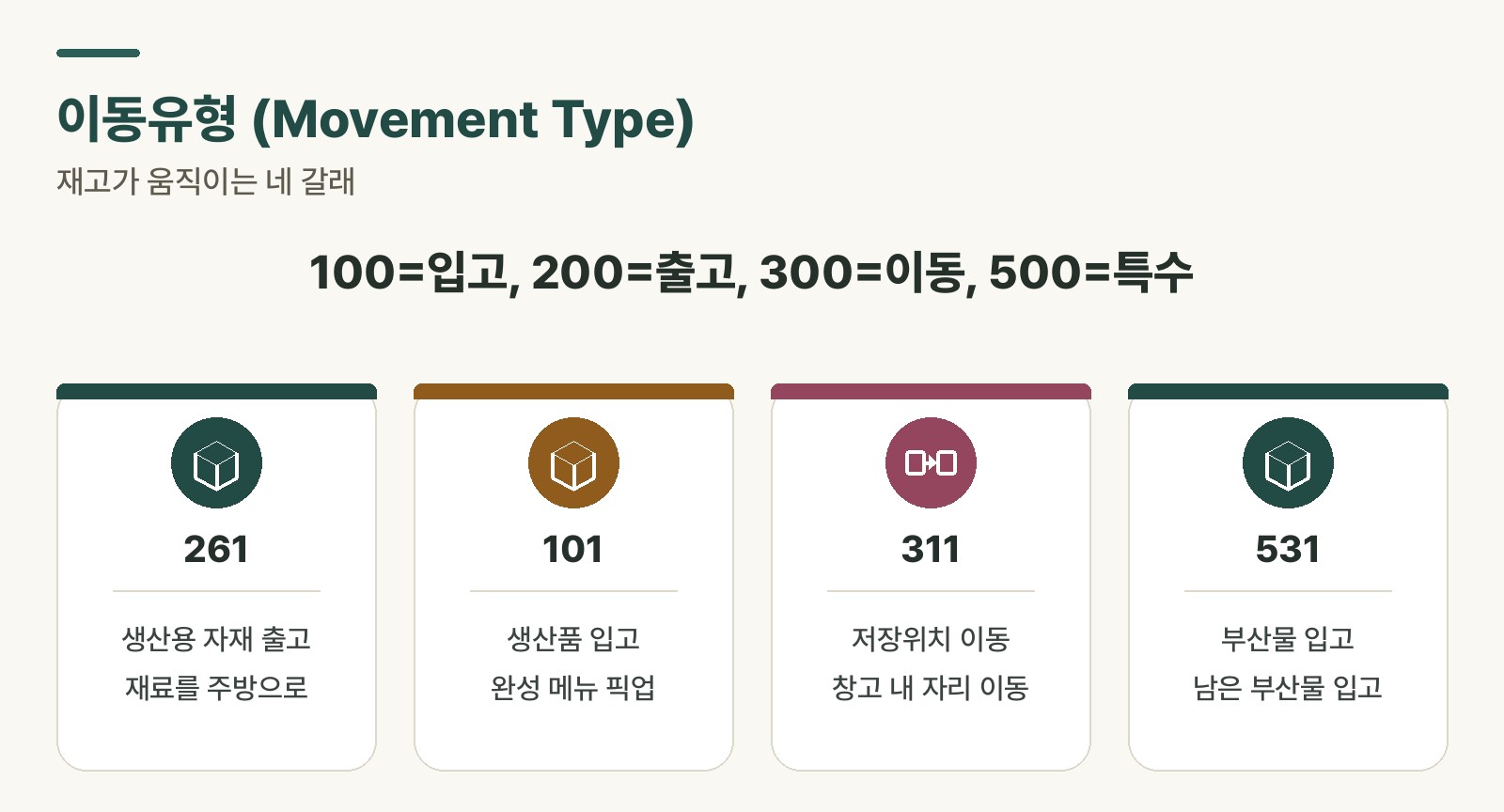 Figure 1. Movement types tracing the flow of inventory
Here’s a summary of the movement types covered so far, including their effect on inventory and whether they generate an accounting document. Keeping them in one table makes it easy to look up when you need it.
| Movement type | Description | Inventory | Accounting document |
|---|---|---|---|
| 101 | Goods receipt from production order | Increase | Generated |
| 102 | Reversal of 101 receipt | Decrease | Generated |
| 261 | Goods issue for order | Decrease | Generated |
| 262 | Reversal of 261 issue | Increase | Generated |
| 311 | Storage location transfer within plant | No change | Not generated |
| 531 | By-product receipt from production order | Increase | Generated |
| 532 | Reversal of 531 receipt | Decrease | Generated |
Table 1. Commonly used movement types in the PP production process
Rabbit’s Takeaway
Movement types are easier to understand as a flow than to memorize outright. Group them as: goods coming in are the 100s, going out are the 200s, moving around are the 300s, and special cases are the 500s — and you can make a reasonable guess even at a code you haven’t seen before. When you see an “E” attached, just think: “this stock has been specifically reserved.”
Instead of just memorizing T-codes and moving on, try asking yourself: “what journey is this piece of inventory on right now?” Do that, and movement types stop being numbers and start reading like a compass for tracking the flow of inventory. 😎
Read more