
SAP PP T-codes, the kitchen's workflow mapped out step by step
A reference of the T-codes used most often in SAP PP production management, organized by order-production-material-shipment flow. Focused on the display and change codes actually used day to day.
Hi, this is Rabbit! 🐰
If you work in SAP PP (production management), you run into T-codes dozens of times a day. “Check the order in CO03, check requirements in MD04, filter in COOIS, fix the shipment in VL02N…” This kind of flow repeats every day.
Because production management spans the entire process from sales order to production to shipment, there’s a lot of codes to punch in and a lot of information to check. So today, here’s a reference of the T-codes used most often in PP practice, organized by workflow order. Keep it around for the moments you’re thinking “what was that code again?”
Note: In practice, most “create” operations use a company-built Z-code, while standard T-codes get used more often for change and display operations. That’s why this post is organized around display and change. If T-code entry itself is unfamiliar, start with SAP T-codes, quickly calling up your kitchen’s regular menu items.
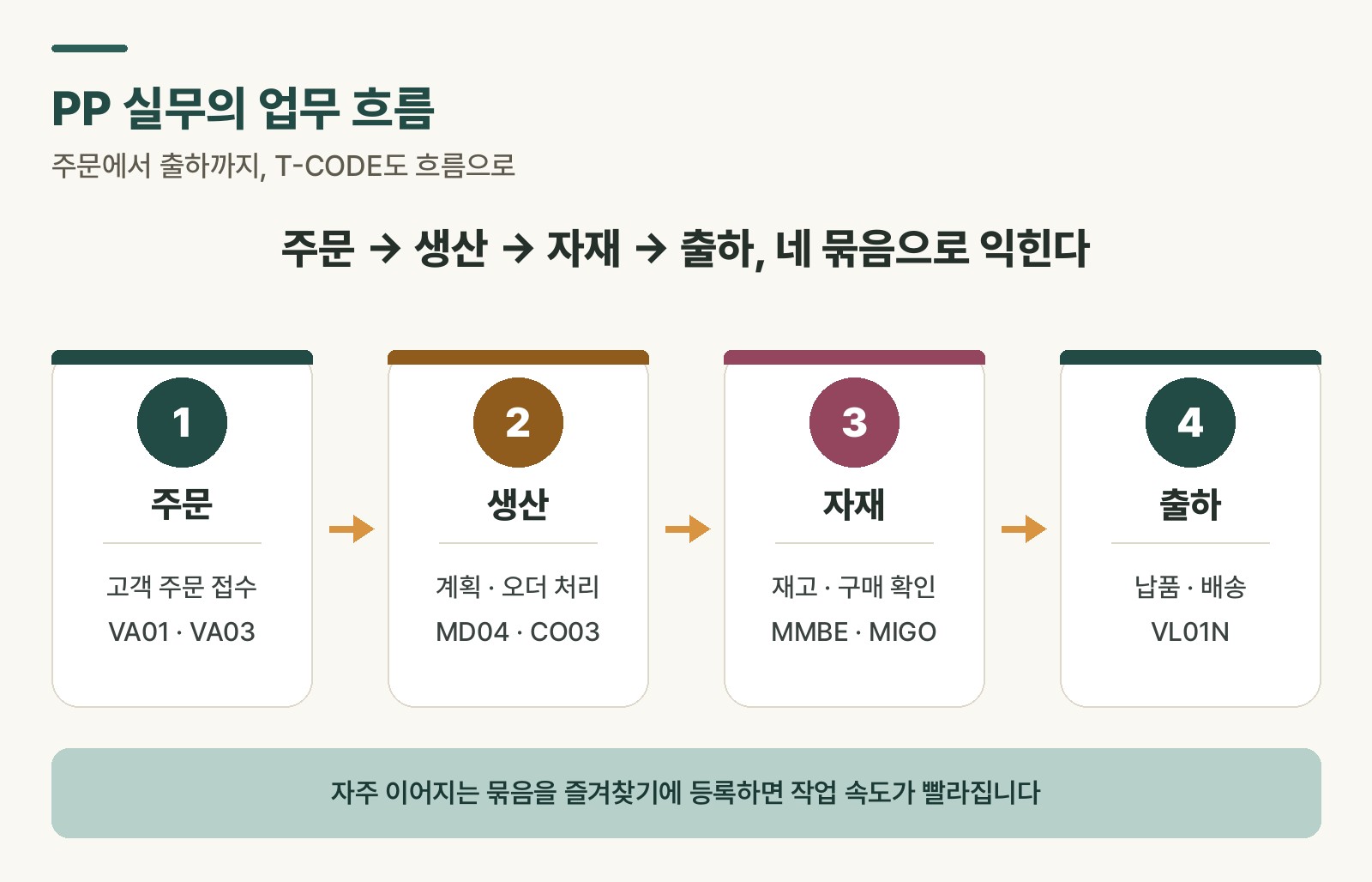 Figure 1. The PP workflow and representative T-codes at each stage
1. Orders (Sales Order)
Production starts with a customer order.
| T-code | Description | Key function |
|---|---|---|
| VA01 | Create sales order | Create a customer order |
| VA02 | Change sales order | Change quantity, delivery date, etc. |
| VA03 | Display sales order | Check order status and details |
Table 1. Key T-codes for the order (Sales Order) stage
2. Production planning and orders (Production)
Production doesn’t run without a plan. These are the codes PP practitioners touch the most.
| T-code | Description | Key function |
|---|---|---|
| MD01N | MRP Live | Run company-wide material requirements planning |
| MD04 | Stock/requirements list | Check supply-demand status per material |
| MD16 | Collective display of planned orders | List of all planned orders |
| CO01 | Create production order | Create a production instruction |
| CO02 | Change production order | Change quantity, dates, etc. |
| CO03 | Display production order | Check production order details |
| COHV | Mass processing of production orders | Batch-process production orders |
| COOIS | Production order information system | Search and filter order lists |
| CA01 / CA02 / CA03 | Create/change/display routing | Manage process routings |
| CS01 / CS02 / CS03 | Create/change/display BOM | Manage bills of materials |
| CS12 | Multi-level BOM display | Full structure down to sub-BOMs |
| CS15 | Where-used list | Parent BOMs that use a given material |
| C223 | Production version maintenance | Register and manage production versions |
Table 2. Key T-codes for the production planning/order (Production) stage
3. Materials management and purchasing (Material)
Production needs materials on hand. These codes cover goods receipt, stock, and purchasing checks.
| T-code | Description | Key function |
|---|---|---|
| MM01 / MM02 / MM03 | Create/change/display material master | Material master data |
| MM17 | Mass maintenance of material master | Bulk-update multiple materials |
| MMBE | Stock overview | Current and reserved stock status |
| MB52 | Warehouse stock list | Quantities by storage location |
| MB51 | Material document list | Goods movement history |
| MIGO | Goods movement | Process goods receipt, issue, and transfer |
| ME52N | Change purchase requisition (PR) | Modify an existing PR |
| ME21N | Create purchase order (PO) | Create a PO for a vendor |
| ME13 | Display purchasing info record | Vendor-specific pricing and terms |
| MB5S | GR/IR balance display | Check receipt/invoice mismatches |
| MSC3N | Display batch | Lot history by material |
Table 3. Key T-codes for the materials management/purchasing (Material) stage
4. Shipping and logistics (Delivery)
Getting the finished product out the door correctly matters just as much. These codes handle shipping, delivery, and freight cost processing.
| T-code | Description | Key function |
|---|---|---|
| VL01N | Create delivery | Create a delivery document |
| VL02N | Change delivery | Modify a delivery document |
| VL03N | Display delivery document | Check delivery document details |
| VL09 | Cancel goods issue | Reverse an incorrectly issued document |
| VT01N / VT02N / VT03N | Create/change/display shipment | Manage shipment documents |
| VI01 / VI02 / VI03 | Create/change/display freight costs | Freight and insurance cost documents |
Table 4. Key T-codes for the shipping/logistics (Delivery) stage
Don’t forget Z-codes
Beyond standard T-codes, each company has its own custom-built Z-codes — named for the fact that they start with the letter Z. Examples include ZBOMPRINT (BOM printout) or ZMM_REPORT (custom material report). Since these are built to match a company’s exact workflow, they often get used even more than standard codes in practice. Alongside the standard code list, it’s worth keeping your own company’s Z-codes documented separately.
Rabbit’s Takeaway
Production management connects every step from sales order to shipment, so it’s most efficient to learn T-codes grouped by workflow rather than in isolation.
For example, registering a frequent sequence like order (VA01) → production order (CO01) → stock check (MMBE) → delivery (VL01N) as favorites noticeably speeds up your work, since you’re not bouncing between screens hunting for codes. Even if creation happens through Z-codes, checking for errors or adjusting schedules often falls back on standard codes, so it’s worth getting comfortable with display codes like CO03, MD04, and COOIS.
Hopefully this post becomes the quick reference you reach for whenever you’re thinking, “what was that code again?” 😎
Read more