
SAP batch management: the kitchen's secret ledger for tracing ingredients
Explains what an SAP batch is, how it differs from an MES lot, and why it matters for traceability, regulatory compliance, and inventory differentiation, using a restaurant ingredient-tracking analogy.
Hi, this is Rabbit! 🐰
Even the same ingredient gets managed differently at a restaurant depending on its delivery date. Korean beef delivered Monday and the same grade delivered Wednesday differ in freshness, and if a quality issue ever comes up, you need to be able to trace exactly which delivery it came from. The supplier might have changed, or the storage conditions might differ.
This unit-by-unit history tracking of ingredient deliveries — in SAP, this is called a batch.
- An SAP batch is a concept for managing units of the same material that differ in production timing, raw materials, or quality.
- A batch holds a product’s origin, quality data, expiration date, and production history.
- When a problem occurs, you can trace exactly the affected batch, and it also enables strategic inventory differentiation.
What is a batch
A batch is a unique identifier assigned when products sharing the same material code still need to be managed separately, because production or delivery timing or conditions differ.
In restaurant terms: the material code “domestic Korean beef sirloin” is a single code, but Monday’s delivery and Wednesday’s delivery are different batches. Even from the same supplier at the same grade, a different slaughter date means a different expiration date and different quality condition.
Manufacturing uses this concept more concretely. In terms of finished goods, “a lot produced on the same day, on the same equipment, from the same raw materials” becomes one batch. For example, 1,000 units produced on Line A on the morning of August 10 and 1,000 units produced on Line B that same afternoon can be managed as different batches even though they share the same material code.
A batch is like a product’s “birth certificate” — a unique history recording where, when, and how it was made.
SAP batch vs. MES lot: a difference in perspective
There’s a concept business users new to SAP often confuse: whether the lot used in shop-floor MES and the batch in SAP are the same thing or different.
The short answer: they’re the same physical object viewed from different angles.
MES lot takes the shop-floor production process perspective. It holds detailed process information like “which oven on Line A ran at what temperature for how many minutes,” “who the operator was,” and “whether there was any equipment issue.” It’s like the head chef’s cooking log.
SAP batch takes the management perspective. It tracks “how many units this batch produced in total, how much inventory remains, how many units shipped to which customer,” “whether the quality inspection passed or failed,” and “when the expiration date is.” It’s closer to a restaurant manager’s inventory and sales ledger.
💡 Key point: Many companies use the MES lot number directly as the SAP batch number, to keep the traceability link between the shop floor and ERP simple. That said, you should confirm in advance that the data design across systems actually supports this approach.
What information a batch holds
A single batch holds information like the following.
- Batch number: a unique identifier. The combination of material code + batch number pinpoints a specific stock.
- Production date and plant: when and at which plant it was made
- Raw material information: which supplier’s raw materials were used
- Quality data (characteristics): quality measurements for that batch — sugar content or moisture for food, purity or viscosity for chemical products
- Expiration date (SLED): shelf life expiration date or minimum storage period
- Status: Unrestricted, Quality Inspection, Blocked, and so on
This information integrates with SAP’s MM and QM modules and is automatically referenced during stock movements, quality inspections, and shipping.
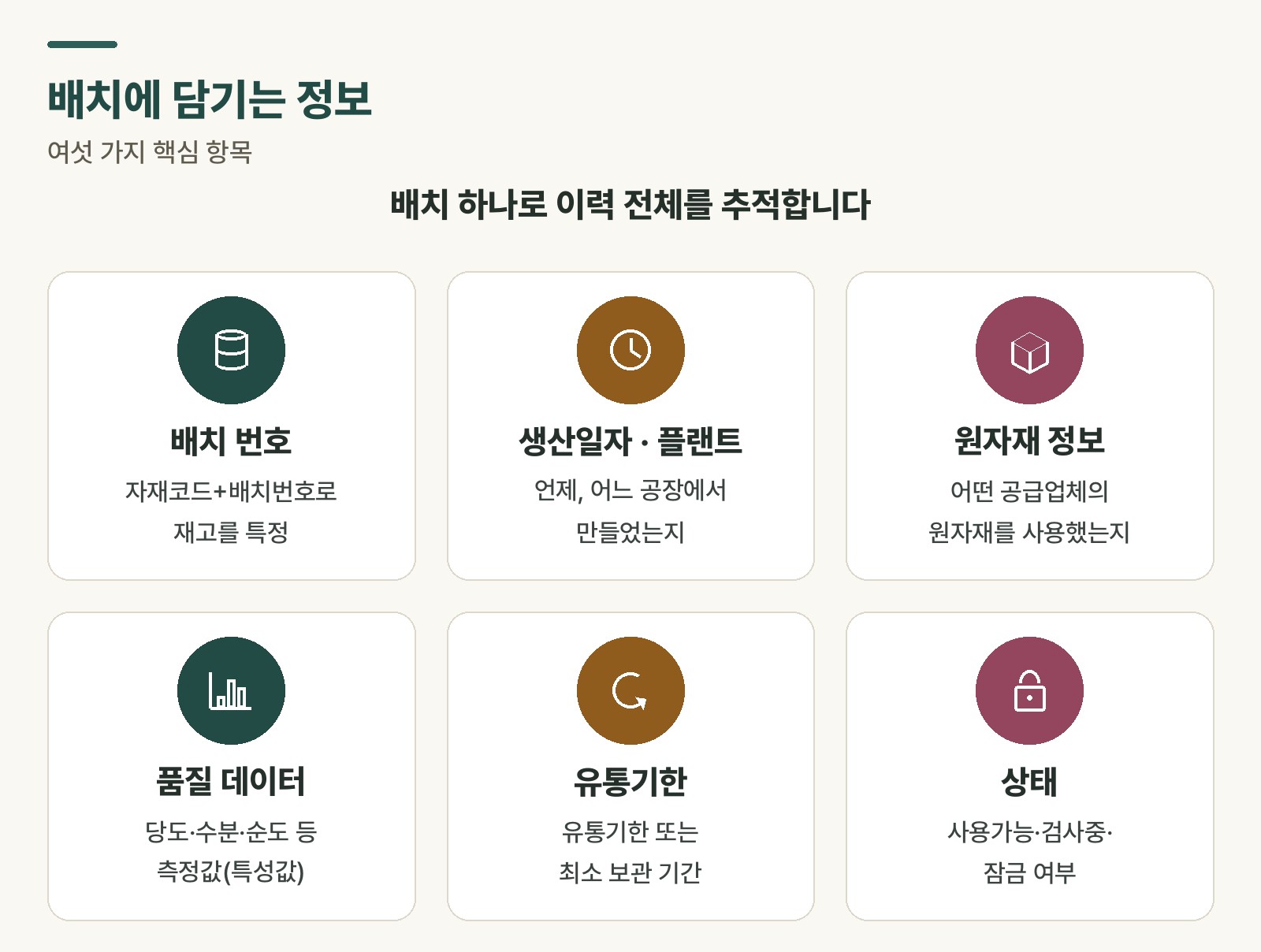 Figure 1. Multiple batches of the same material and the structure for managing history per batch
Three reasons batch management matters
First, fast traceability.
Suppose a customer at a restaurant reports food poisoning symptoms one day. Without batch management, you might have to discard the entire stockroom’s worth of that ingredient. With batch management in place, you only need to trace the delivery from that specific date.
The same applies in manufacturing. When a recall situation happens, being able to trace which production batch had the problem lets you minimize the affected scope. Instead of a full recall, you only need to respond to that specific batch, reducing both cost and loss of trust.
Second, regulatory compliance.
In industries directly tied to human safety — food, pharmaceuticals, chemicals — product history tracing is legally mandated. GMP (Good Manufacturing Practice) and HACCP (Hazard Analysis and Critical Control Points) are prime examples. Batch management is the basic infrastructure for complying with regulations like these.
Third, strategic inventory differentiation.
Even the same material can have different quality grades depending on the batch. You can manage strategies through the system, such as assigning Supplier A’s delivery to premium products and Supplier B’s to standard products, or shipping batches with shorter shelf life first under a first-expired-first-out (FEFO) strategy.
Managing batches in SAP
The main T-codes for creating, changing, and viewing batch information in SAP are:
MSC1N: create batchMSC2N: change batchMSC3N: display batch
⚠️ Note: To use batches, batch management must first be activated in the material master. Without this setting, a batch number can’t be assigned to that material. If you’re considering adopting batch management, start by checking the material master setting.
To search for batch information by condition or check stock status for a specific batch, MB56 (batch classification search) and MB52 (warehouse stock display) are also useful. You can review the full batch management process on the SAP Help Portal: SAP Help — Batch Management
Rabbit’s Takeaway
Whether to adopt batch management depends on the industry and product characteristics. In many cases it isn’t needed, and adopting it unnecessarily only adds input burden.
There’s one criterion for deciding whether batch management is needed: “Do we need to trace a specific production unit when a problem occurs?” If the answer is yes, batch management is worth considering; if no, you can skip it.
In an SAP project, whether to adopt batch management should be decided early in the build. Adding it midway makes converting existing inventory data much harder. It’s worth carefully reviewing business requirements from the start. 😎
Read more