
SAP circular BOM: pouring a failed broth back into the pot
Explains what an SAP circular BOM is, why rework situations need one, and how to set it up, using a simple broth analogy.
Hi, this is Rabbit! 🐰
You’ve just finished a whole pot of broth. You taste it one last time, and it’s flat. It can’t go out to the dining room like this.
But you can’t throw out an entire pot either. So the chef puts it back on the heat, adds more ingredients, and brings it back to a proper broth.
Write that process down as a recipe, though, and something looks strange.
How to make kalguksu broth Ingredients: anchovies, kelp, radish, and one pot of under-seasoned kalguksu broth
The recipe for kalguksu broth has kalguksu broth in its ingredient list. In SAP, this kind of recipe is called a circular BOM (recursive BOM) — a structure where a finished product appears again in its own list of components.
It sounds impossible, but it happens on factory floors every day.
- A circular BOM is a structure where a finished product appears again in its own component list.
- It’s used for rework — fixing a defective unit and turning it back into a good one.
- You have to check “Allow cycles” on the BOM item screen, or the system throws an error.
Why a recipe like this happens
A BOM (bill of materials) is essentially a recipe. It’s the list of what you need, and how much, to make something.
Most recipes run in one direction. Put anchovies, kelp, and radish in a pot, simmer, and you get broth. Ingredients become food, and that’s the end of it.
The failed broth above runs differently. Written out as a recipe, it looks like this.
- To make proper broth → you need a “re-simmer” step
- The “re-simmer” step → takes under-seasoned broth as input
Broth goes through a process and comes back out as broth. The starting point and the end point are the same material.
The important part is that nothing gets thrown away — it gets recovered. This isn’t the same as carrying yesterday’s broth forward for flavor. It’s taking something that came out wrong and returning it to what you meant to make in the first place.
On a factory floor this is called rework. A finished product goes into the warehouse, quality inspection flags it as defective, and rather than scrap it, you fix it and bring it back as a good unit. It happens constantly in manufacturing.
Why the system gets stuck in a loop
The problem is that SAP reads this recipe literally.
When SAP calculates “how much material do I need to make 100 of these,” it expands the recipe one level at a time. 100 servings of broth → check the ingredient list → check the ingredients of those ingredients → keep going down.
But a rework recipe loops back to where it started. Broth → re-simmer → broth → re-simmer → broth…
There’s no end to it. The system can’t find a place to stop and keeps recalculating. That’s an infinite loop.
So by default, SAP treats this structure as an error. Try to save it as-is and it blocks you.
One checkbox solves it
The fix is simpler than you’d expect. You just have to tell SAP, “this isn’t a mistake — I built it this way on purpose.”
When you register the defective unit as a component in the rework BOM, check the “Allow cycles” checkbox on the item detail screen. That single check is the signal that says “a cycle here is expected, so stop calculating.”
⚠️ Note: Miss this checkbox and either the BOM won’t save at all, or MRP throws an error later. It’s the most commonly overlooked step when building a rework BOM, so make a point of confirming it.
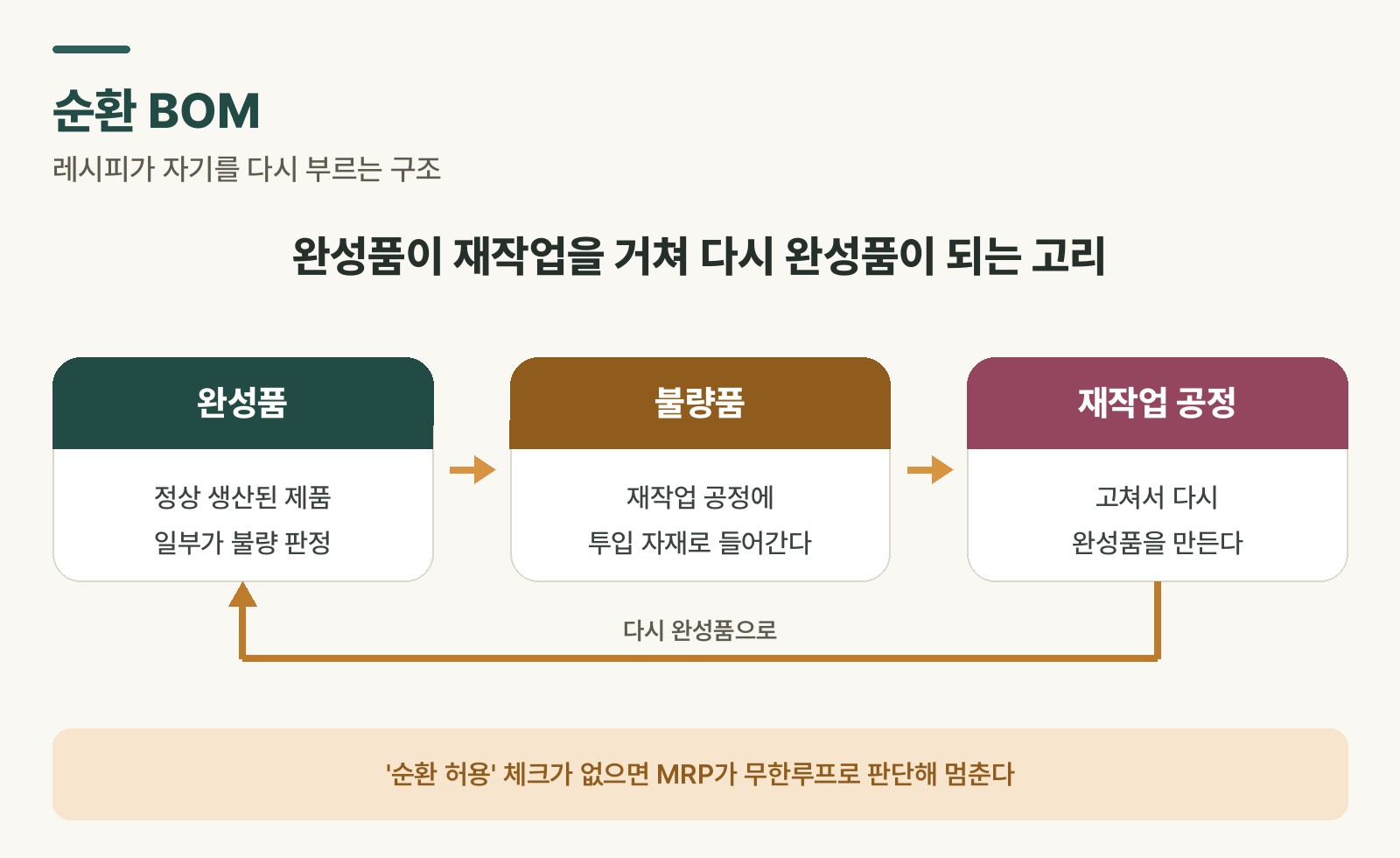 Figure 1. The circular BOM structure in a rework scenario, and the “Allow cycles” setting
Checking that it worked
Once you’ve saved the setting, verify the structure with CS12 (multi-level BOM display). It’s the screen that expands a recipe from top to bottom.
If everything is set up correctly, you’ll see something like this.
Finished product
└─ Rework step
      └─ Finished product (defective)   ← stops here
The finished product shows up again on the third line, but the system stops there instead of expanding further. That means it recognized the cycle.
Getting into the habit of checking this screen right after setup will save you from MRP errors down the line.
When to use one, and when not to
There are three common situations where circular BOMs come up in practice.
Rework: fixing a defective finished product and turning it back into a good one. By far the most common.
Byproduct recycling: feeding a byproduct from production back into the same process. Common in chemical and food manufacturing.
Catalyst reuse: recovering a catalyst after the reaction and putting it back into the same process.
What they share is that something already made, or something that came out of it, goes back in.
There are also cases where you don’t need one. If reworked units are managed under a different material code entirely, the start and end points become different materials, and no cycle forms. Which way to go depends on cost accounting policy and traceability requirements, and it should be settled during project design.
What happens to cost
There’s a natural worry here.
“If the structure is circular, doesn’t the cost just keep adding up forever?”
It doesn’t. When SAP costs a circular structure, it doesn’t expand the recipe all the way down. Instead it pulls the current standard cost already assigned to the material. It breaks the loop by saying, in effect, “this ingredient’s value is already settled, so there’s nothing more to work out.”
There is one thing to watch, though. When a single material has more than one recipe (one for normal production, one for rework), you have to decide which one costing should be based on. That’s what the production version is for. The recipe tied to the highest-priority production version, set in the material master’s costing view, is what gets used for standard cost.
💡 Key point: To keep the rework recipe from disturbing standard cost, give the normal production version higher priority. If production versions are new to you, start with SAP PP master data.
Three things to check before you set it up
Get these sorted before building a circular BOM.
First, make sure the material codes exist. Both the finished product code and the rework step code have to be in the material master before you can build the BOM.
Second, decide how the reworked product will be coded. Same code as normal product, or a separate one? That choice determines whether you need a circular BOM at all.
Third, talk to the costing team first. Agree on production version priority together, or standard cost will drift.
Rabbit’s Takeaway
A circular BOM looks impossible the first time you see one. A thing being its own ingredient doesn’t seem to add up.
But in a real kitchen, pouring a failed broth back into the pot is ordinary. And on a factory floor, fixing defective units happens every day. SAP supports this structure for one reason: that’s how reality works.
A system isn’t a tool for tidying reality up — it’s a tool for holding reality as it actually is. A single “Allow cycles” checkbox quietly makes that point. Leave it off, and both your inventory and your costs start drifting away from what’s really on the floor. 😎
Read more