
SAP organizational structure and master data, the skeleton and recipes behind opening a restaurant
What SAP's organizational structure (client, company code, plant, storage location) and core master data (material master, BOM, work center, routing) actually are, explained through the analogy of opening a restaurant.
Hi, this is Rabbit! 🐰
Say you’re opening a new restaurant. You sign the lease, decide where the kitchen goes, and draw up a floor plan for which area is the dining room and which is storage. Then you write the recipes, decide which ingredients to use, and figure out the order to cook things in.
SAP works exactly the same way. Before you can use the system, you first have to define “how our company is structured” inside SAP, and then register the core data that will run on top of that structure.
These two pieces are Organizational Structure and Master Data.
- Organizational structure sets up your company’s legal entities, plants, and warehouses inside SAP. Once it’s set, it’s hard to change.
- Master data is the core data built on top of that structure, used repeatedly in day-to-day work.
- Production, purchasing, and sales only run accurately when both the organizational structure and master data are set up correctly.
Organizational structure: the restaurant’s building blueprint
Organizational structure defines how your company is set up inside SAP. Once it’s in place, it’s very hard to change later, so it needs to be designed carefully at the start of implementation.
In restaurant terms, this is the stage where you design the building itself.
A client is the largest unit in the entire SAP system. All data and users belong within it — think of it as the whole universe that contains your entire restaurant group.
A company code is a legal entity with its own independent set of books. It’s the basis for producing separate financial statements. If your restaurant group has a Gangnam branch and a Hongdae branch as separate legal entities, each gets its own company code.
A plant is the core unit for production and inventory management — a factory or site with production facilities. In restaurant terms, the plant is the actual location with the kitchen where cooking happens.
A storage location is where inventory is physically kept within a plant — a walk-in fridge, dry storage, a packaging supply room, that kind of division. It’s the basic unit for physical inventory counts.
💡 Key point: The plant is the organizational unit you’ll run into most often in SAP. Material masters, production orders, and purchasing documents are all managed at the plant level. Figuring out which plant you work in is the first step to understanding any SAP screen.
Beyond these, there’s also the purchasing organization and the sales organization. A purchasing organization manages which vendors you buy from and under what contract terms; a sales organization manages which channels sell to which customers.
The most important feature of organizational structure is “connection.” Which company code a plant belongs to, which purchasing organization is responsible for which plant — these links have to be specified in SAP configuration for the system to function as one whole.
Master data: the restaurant’s recipes and ingredient list
Once the building — the organizational structure — is complete, you need something to fill it with. The core data used repeatedly in daily operations is master data.
On the production floor, there are four essential pieces of master data.
Material master holds the information for every item the company buys, produces, and sells. A single material code has multiple “views,” and different departments manage different fields on it. Purchasing cares about order units and delivery lead time, production cares about MRP-related settings, and accounting cares about how the price is managed.
In restaurant terms, the material master for “domestic beef sirloin” is like an ingredient ID card — it holds the purchase price, storage method, shelf life, and cooking unit all in one place.
BOM (Bill of Materials) is the list of materials needed to make one finished item. A recipe saying that one serving of doenjang jjigae needs 30g of doenjang paste, 60g of tofu, and 40g of zucchini — that’s a BOM. MRP explodes the BOM to calculate how much of each material is needed.
A work center is the equipment or line where actual production happens — the cooking team, the pasta station, the dessert prep area — defining where which task takes place. It’s the basis for capacity planning and cost calculation.
Routing is the cooking sequence for making a finished item. Like the steps for cooking doenjang jjigae, it defines which work center handles which step, in what order, and how long each takes. Routing is what lets you calculate production lead time and reflect the processing cost of each step in the product cost.
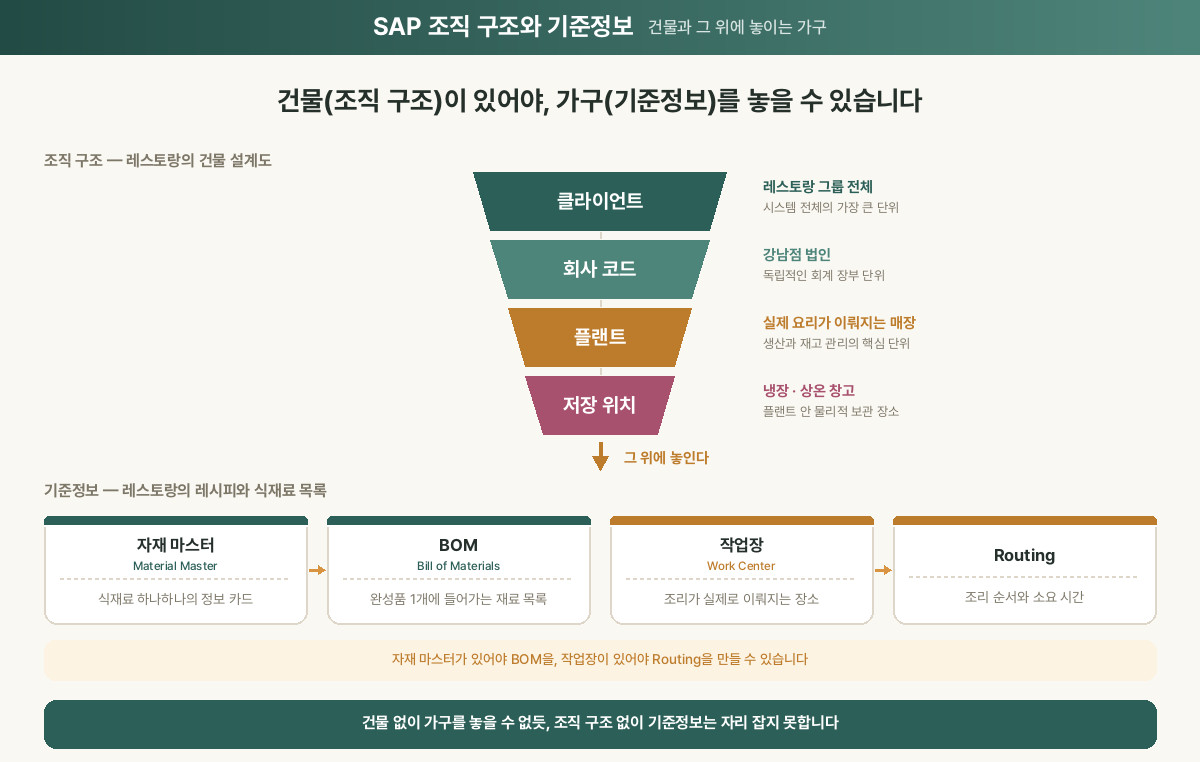 Figure 1. The relationship between SAP organizational structure and master data
How the two relate: building and furniture
The relationship between organizational structure and master data is like a building and its furniture.
Without the building structure (org structure), you have nowhere to put the furniture (master data). But a building with no furniture can’t actually run a business either.
There’s also an order to creating master data. The material master has to be registered before you can build a BOM. The BOM has to exist before MRP can calculate material requirements. The work center has to be defined before you can build a routing.
In restaurant terms, you need the ingredient list (material master) before you can write the recipe (BOM), and the kitchen layout (work center) has to be finalized before the cooking sequence (routing) means anything.
⚠️ Note: Poor master data quality affects every part of the operation. If the lead time is wrong on a material master, MRP will trigger the wrong purchase orders. If a BOM has a quantity error, every production run will either run short or have leftover material. This is exactly why so much effort goes into getting master data right early in an implementation.
Rabbit’s Takeaway
When you’re first learning SAP, the organizational structure setup screens live under T-code SPRO (IMG), and consultants handle that configuration. Business users rarely touch those settings directly.
Master data is different. Updating the material master, changing a BOM, managing work centers — these often become the business user’s responsibility. Especially when a new product launches, a process changes, or a vendor changes, master data needs to be updated quickly for the system to keep working correctly.
Consultants design the organizational structure, but master data is what business users keep alive. 😎
Read more