
SAP data types: sorting recipes, ingredients, and order slips
Most SAP errors trace back to one of three places: configuration, master data, or transaction data. Explains the three data types using the analogy of house operating rules, an ingredient reference sheet, and order records.
Hi, this is Rabbit! 🐰
Run a restaurant for a while and you’ll hear these all the time: “I think we set up the house rule wrong,” “hey, the ingredient unit is off,” “today’s order got logged twice.” All three sound like “something’s wrong,” but they’re actually problems at completely different layers.
It’s the same in SAP. If you can’t tell which of the three data types — configuration, master data, transaction data — is where things went sideways, you’ll chase one error around all the wrong places. This distinction might be the single clearest line between an SAP beginner and someone who’s leveled up.
- Nearly every problem in SAP traces back to one of three places: configuration, master data, or transaction data.
- Configuration is the house’s operating rules, master data is the ingredient reference sheet, and transaction data is the day’s order records.
- Knowing which of these three layers to check first when something breaks is what real skill looks like.
The house’s operating rules: configuration data
First up is configuration data. Think of it as the operating rules you set before opening the doors — things like “should order numbers be assigned automatically or entered manually,” “should we use inventory in the order it arrived, or by expiration date,” “is this dish made ahead of time (make-to-stock) or only when ordered (make-to-order).”
These rules are set once and rarely changed. But since they’re the basic framework the whole system runs on, the entire operation stops if one is missing. If the rule for auto-assigning order numbers gets dropped, for instance, no one can register a new order. In SAP, this is set up in a screen called SPRO (IMG, Implementation Guide). Consultants or IT usually handle it, but it helps for regular practitioners to at least have a sense of “this might be a configuration issue.”
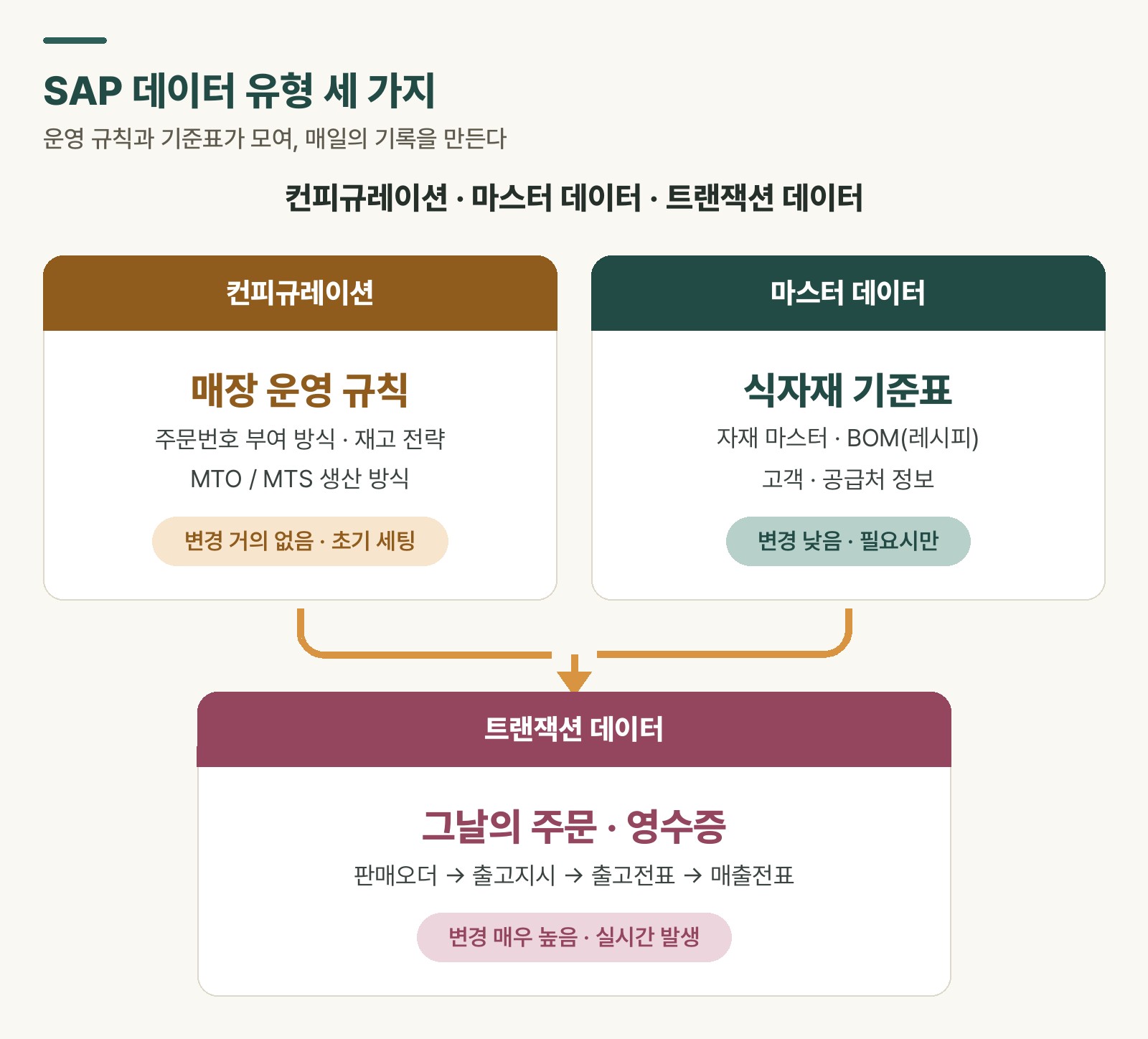 Figure 1. SAP’s three data types — operating rules and reference sheets come together to make the daily record
The ingredient reference sheet: master data
Next is master data, or reference information. It’s data you register once and keep pulling into different tasks — the restaurant’s ingredient reference sheet or vendor directory. In SAP, this includes material masters, BOMs (recipes), and customer/vendor information.
Master data is often called the system’s basic fitness level, because accuracy is everything. Imagine an ingredient’s unit gets entered as ‘MT (metric ton)’ instead of ‘KG’ by mistake. Inventory quantities, production input amounts, and cost calculations all cascade into chaos from that one error. That’s why master data creation and changes are usually handled by a dedicated, authorized team rather than by front-line staff.
The day’s order record: transaction data
Last is transaction data — the records generated moment by moment while the restaurant is open: the day’s order slips and receipts. In SAP, every act of creating a production order, receiving material, or requesting a purchase gets logged as transaction data.
These records are generated based on the operating rules (configuration) and the ingredient reference sheet (master data) set earlier. So when an error shows up in a transaction, you need to check whether it’s a problem with the record itself, or with the rules or reference data underneath it.
Following the document flow
A defining trait of transaction data is that it links together into a flow — what’s called a “document flow.”
- A customer places an order, and a sales order is created.
- The kitchen turns that into a cooking and issue instruction.
- When the dish goes out, a goods issue slip is created.
- Finally, a billing document is issued.
Tracing this flow backward when an error occurs is the most basic and reliable way to solve it.
💡 Key point: A transaction is just the result — the cause is usually one step back, in configuration or master data.
| Category | Configuration | Master data | Transaction data |
|---|---|---|---|
| Role | House operating rules | Ingredient reference sheet | Day’s orders and receipts |
| Change frequency | Almost never (initial setup) | Low (changed as needed) | Very high (happens in real time) |
| Main users | Consultants, IT admins | Data management team | All business users |
| Examples | Plant code, order type definitions | Materials, customers, BOMs | Production orders, purchase orders, goods receipt slips |
Table 1. SAP data types — comparing configuration, master data, and transaction data
Rabbit’s Takeaway
When you get an SAP error message, the instinct is to jump straight to “so what do I need to fix?” But there’s a real first question that comes before that: is the thing you’re stuck on a house operating rule (configuration) problem, an ingredient reference sheet (master data) problem, or just today’s record (transaction) problem?
Once you sort that out, where to look and who to ask both become clear. The person who pinpoints exactly which layer an error lives in is the real expert — more than the person who’s just fast at fixing things. 😎
Read more