
SAP PP master data, understood through four essentials
The four pillars of master data that SAP PP is built on — material master, BOM, routing, and production version — explained at a beginner's level through the lens of running a restaurant menu.
Hi, this is Rabbit! 🐰
Spend enough time working with PP and you’ll hear this line often: “every problem starts and ends with master data.” It sounds like an exaggeration, but it’s mostly true. Master data is like the rebar holding up the building of production management — if that framework is weak, production planning, material calculations, and cost accounting all wobble along with it.
In restaurant terms, master data is “the set of agreements decided ahead of time so the menu can actually get made.” Which dishes are sold, what ingredients they’re made from, and in what order they’re cooked all need to be pinned down precisely for the kitchen to run smoothly. Today, let’s walk through the four pillars of master data that hold up PP, one at a time.
- The core of PP master data comes down to four things: material master, BOM, routing, and production version.
- Each answers a different question: what, with what, how, and in what combination.
- MRP, production orders, and costing all only work correctly when this data is accurate.
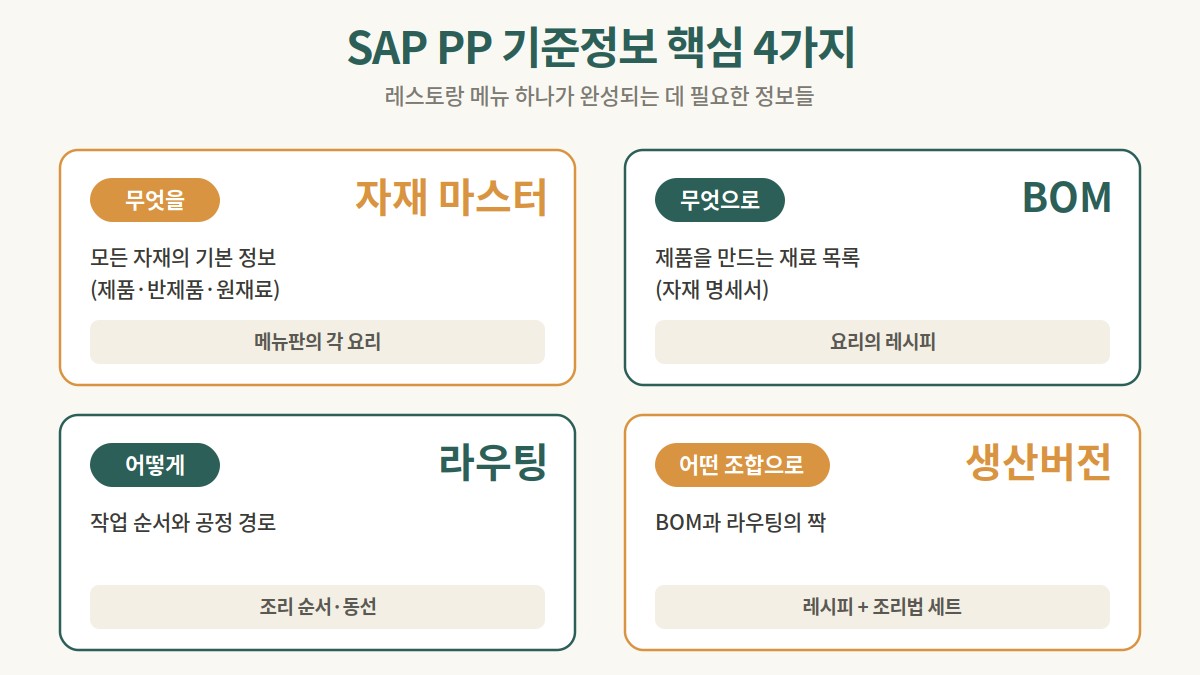 Figure 1. The four types of PP master data, mapped to the restaurant analogy
1. Material master — what (the star of the show)
The start and end point of PP master data is the material master. The BOM and routing we’ll look at next both revolve around this “material” at their core.
The material master is the detailed profile for every item you manage. Every finished product, component, and packaging item gets a unique material number, along with information like “this is a finished good,” “this is a raw material,” “counted in units of pieces,” “stored in warehouse A.”
In restaurant terms — the signature “kimchi jjigae” dish is a material, the “napa cabbage” and “chili powder” that go into it are materials, and even the takeout container is a material. Giving each one a number and defining its properties is what the material master does. It’s the first building block of PP master data — defining the agreed-upon identity of every item the system needs to know about.
2. BOM — with what (the product’s recipe)
Once the star ingredient — the material — is defined, next comes the BOM (Bill of Materials).
A BOM is the recipe defining “which” materials and “how much” of each are needed to make one finished product. It’s the same data that showed up as “the recipe” in the earlier MRP post.
Why does this matter so much? Say the kimchi jjigae recipe is missing “chili powder.” The system can receive a plan to make 100 servings of kimchi jjigae and never realize chili powder is needed. Purchasing never orders it, and cooking grinds to a halt.
| Finished product | Ingredient | Quantity needed | Unit |
|---|---|---|---|
| Kimchi jjigae | Napa cabbage | 1 | head |
| Kimchi jjigae | Chili powder | 0.2 | kg |
| Kimchi jjigae | Pork | 0.15 | kg |
Table 1. Sample BOM (recipe) for kimchi jjigae
The BOM clearly defines every component that makes up a product, and it becomes the single most important foundation for MRP and cost calculation.
3. Routing — how (the cooking sequence)
With the recipe (BOM) ready, next comes deciding “how to make it.” Routing is the process information that defines the order and method for making a product — think of it as the kitchen’s step-by-step cooking sequence.
“Prep the ingredients in step 1, make the broth in step 2, bring it to a boil in step 3, season to taste at the end.” That’s the kind of workflow routing captures. Routing records where each step happens (work center) and how long it takes (standard time). This information is what lets you calculate accurate production lead times, forecast the load on each process, and issue the right work instructions.
| Operation | Task | Work center | Time required |
|---|---|---|---|
| 10 | Prep ingredients | Prep station 1 | 10 min |
| 20 | Make broth | Burner 2 | 30 min |
| 30 | Boil and season | Burner 2 | 15 min |
Table 2. Sample routing (cooking sequence) for kimchi jjigae
An inaccurate routing leads to a wrong production schedule and a distorted cost — bad inputs produce bad outputs, plain and simple.
4. Production version — in what combination (pairing BOM and routing)
The last piece. So far we’ve covered the material master (what), the BOM (with what), and routing (how). The production version is the master data that ties all of these together.
A production version specifies, for a given material, which BOM and which routing to use together — it’s the piece that pairs a BOM with a routing.
Why is this necessary? Even for the same kimchi jjigae, the ingredient mix (BOM) and cooking method (routing) can differ between everyday kitchen production using the standard method (production version 001) and a large-batch cook in a giant pot for a catering order (production version 002). Production versions register these different production methods in the system so the right one can be selected depending on the situation.
The production planner doesn’t need to overthink it — just pick the production version that fits the situation, and the system automatically pulls in the assigned BOM and routing to build the production order.
Rabbit’s Takeaway
The four pieces of master data can be summed up in one line: material master answers “what,” BOM answers “with what,” routing answers “how,” and production version answers “in what combination.” All four have to mesh together like gears for production management to run.
A large share of the problems that trip people up in PP, once you dig in, trace back to weak master data. That’s why accurate master data comes before flashy functionality — the same way great cooking depends on good ingredients and a precise recipe. Nail down these four, and you’ve understood half of PP. 😎
Read more