
SAP for beginners: the integrated brain behind a restaurant kitchen
For anyone puzzled about what SAP actually is, this post breaks down the system that ties a whole company together, using the analogy of running a restaurant.
Hi, this is Rabbit! 🐰
Ask someone to explain exactly what SAP is, and it’s surprisingly hard to answer. It sounds like accounting software, sounds like inventory management, and somehow sounds like all of it at once.
The easiest way to understand it is through a restaurant. A single place where orders, cooking, inventory, and the register all run together in real time — that’s essentially how SAP works. Today, let’s unpack SAP through that lens.
- SAP is a company’s “integrated operating system” that ties scattered departments together.
- The dining floor, kitchen, storeroom, and register all share the same information in real time.
- It’s the world’s leading ERP brand, letting you pick and choose functionality like Lego blocks (modules).
Picture SAP as a restaurant
Picture a restaurant that runs like a well-oiled machine. An order taken on the floor goes straight to the kitchen, the storeroom checks stock and restocks as needed, and the register keeps the sales tally. Nobody has to call another station to double-check anything. Everyone sees the same information in real time and moves as one.
Real companies usually don’t work that way. Each department uses its own tools — sales runs on spreadsheets, production keeps its own notes, accounting has a separate program. When everything runs separately like this, the same information gets entered twice, inventory numbers stop matching, and mistakes creep in.
SAP is the system that turns a scattered company into that well-run restaurant.
Just as an order entered on the floor automatically flows to the kitchen, storeroom, and register, a single entry in SAP connects to every department that needs it.
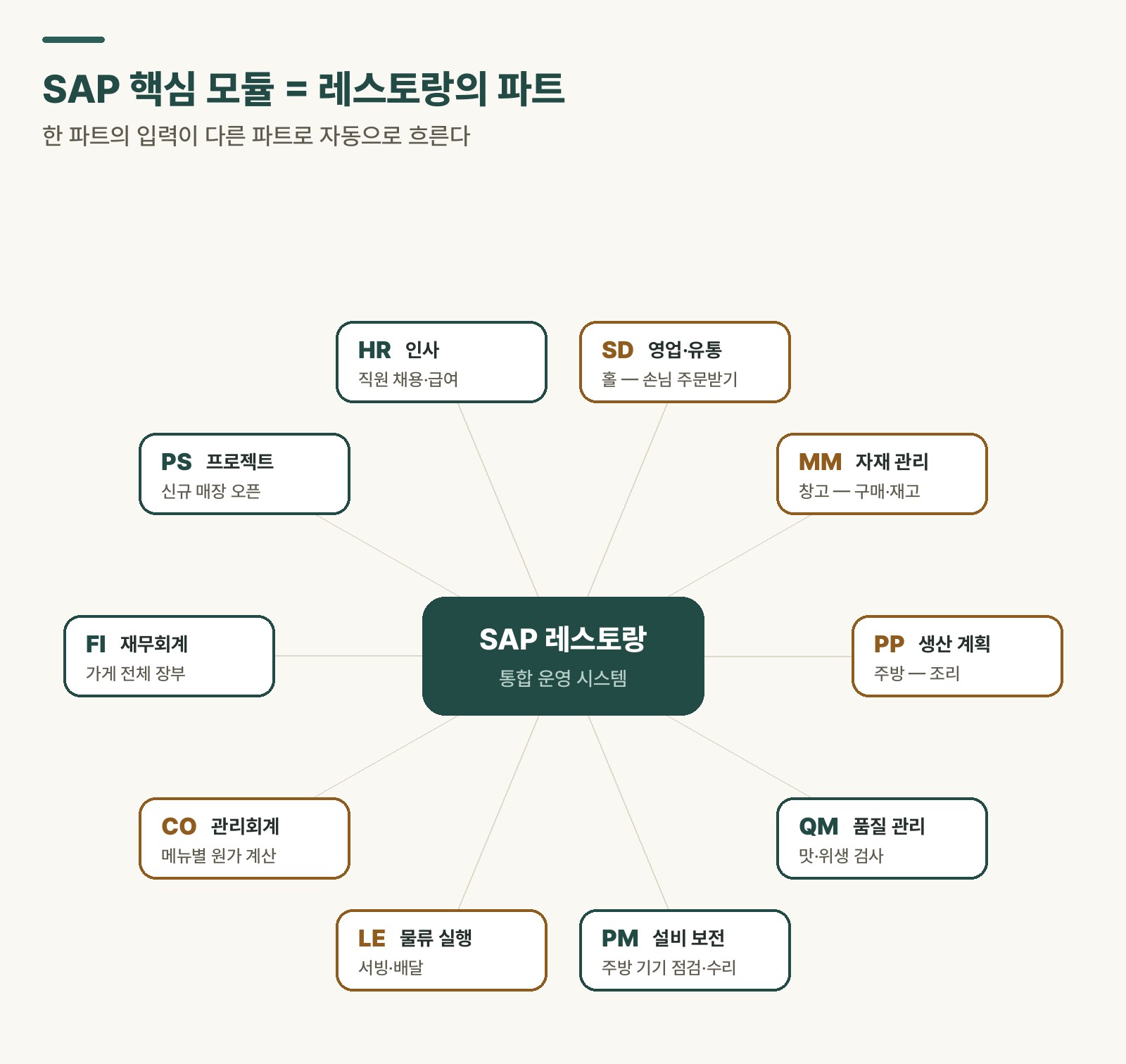 Figure 1. How one entry connects every department — SAP’s core structure, through a restaurant analogy
Starting with ERP
Whenever SAP comes up, the word ERP follows right behind it. ERP stands for Enterprise Resource Planning.
This is easier to grasp through the restaurant, too. Managing how much stock is left (inventory), how many orders came in (sales), and how much was spent on ingredients (accounting) — all on one screen. The tool that ties all of this together is ERP, and SAP is the world’s leading brand in that space.
A module structure you build like Lego
One of SAP’s biggest strengths is that it delivers functionality in module blocks. Like Lego bricks, a company picks only the pieces it needs, and can expand later without much trouble.
| Abbreviation | Name | Role in this restaurant |
|---|---|---|
| SD | Sales | Taking customer orders |
| MM | Materials | Purchasing ingredients, managing the storeroom |
| PP | Production | Cooking in the kitchen |
| CO | Controlling | Costing each dish on the menu |
| FI | Finance | The restaurant’s overall ledger |
Table 1. SAP’s five core modules (the rest are covered in a separate post)
💡 Key point: Modules aren’t isolated — they’re connected as one. An order from the floor (SD) automatically flows through to the kitchen (PP) and the storeroom (MM).
Rabbit’s Takeaway
Everyone feels a little lost the first time they see an SAP screen — all those cryptic codes and buttons. But there’s one thing worth remembering: SAP is, at its core, a system built for people.
It ties scattered departments into a single restaurant, so everyone can work more accurately and with less friction. As we tour this restaurant one station at a time in future posts, SAP should start to feel a lot more familiar. 😎
Read more