
SAP PP: how a kitchen's production plan comes together
What SAP PP (Production Planning) is, and how the flow from BOM and routing through MRP to production orders works, explained through a restaurant analogy.
Hi, this is Rabbit! 🐰
If you were just handed your first restaurant kitchen to run, what’s the first thing you’d do? You’d predict how many tables to expect today, and decide which dishes to prep in what quantities. You can’t run out of ingredients, but you can’t be left with piles of leftovers either. And the taste can’t change whether you’re plating one bowl or a hundred.
SAP PP (Production Planning) is the module that solves exactly this problem with a system. PP plans “what to make, how much, when, and how,” and then tracks whether production actually executed according to that plan — it’s the core module for production management.
- SAP PP is built around two pillars: planning and execution.
- The core of the planning pillar is the master data of BOM and routing, and the MRP process that runs on top of it.
- On the execution side, a production order gets issued, and once work is complete, it’s wrapped up with a CNF (confirmation).
Master data: the recipe and the cooking sequence
For a kitchen to run, two things need to be in place first: knowing what to make and how to make it.
SAP PP works the same way. Before production can start, two pieces of master data need to already be registered in the system.
BOM (Bill of Materials) is the recipe. Making one serving of kimchi jjigae takes 80g of pork, 150g of kimchi, and 60g of tofu — that ingredient list is the BOM. In SAP, every material and quantity needed to make one finished product is defined in the BOM.
Routing is the cooking sequence. Heat oil in the pot → stir-fry the pork → add kimchi and stir-fry → add water and bring to a boil → add tofu and finish. Routing defines the order of each step, which piece of equipment (work center) handles it, and how long it takes.
💡 Key point: BOM and routing are covered in more depth in SAP PP master data. Reading it alongside this post makes the bigger picture of PP master data much clearer.
Planning: how MRP builds the shopping list
Once master data is in place, next comes the planning stage. MRP (Material Requirements Planning) is what answers the question, “We’re expecting around 200 servings of kimchi jjigae to go out this week — how much of each ingredient do we need to have ready?”
Feed MRP a production target quantity, and it explodes the BOM to calculate the total requirement for every material involved, subtracts current inventory, and even works out the schedule for when any shortfall needs to be procured by.
Here’s an example.
- Target: 200 servings of kimchi jjigae
- BOM explosion: 16kg of pork, 30kg of kimchi, 12kg of tofu needed
- Subtract current stock: 5kg of pork in stock → 11kg needs to be ordered
- Factor in lead time: delivery takes 2 days, so the order needs to be placed by the day after tomorrow
MRP runs this same calculation simultaneously across hundreds of materials. Work that would take a person a full day to do by hand gets done by the system in minutes. For more on MRP, see the detailed SAP MRP post.
Once MRP runs, it generates a planned order — a draft instruction saying “plan to make this item, in this quantity, by this date.” It’s not yet an actual production instruction.
Execution: from issuing the production order to CNF
Once the plan is confirmed, the planned order gets converted into a production order. Actual production begins from this moment.
Once a production order is issued, three things happen in sequence.
First, goods issue. The materials defined in the BOM leave the warehouse for the kitchen. In SAP, this triggers movement type 261.
Second, process execution. Each operation proceeds at its work center, in the order defined by the routing. Along the way, the actual time spent, quantities, and any defects get recorded.
Third, CNF (confirmation). As each operation finishes, the results get reported into SAP, switching the activity status to CNF. This data becomes the basis for cost calculation.
⚠️ Note: Issuing a production order doesn’t automatically release the materials. Goods issue has to be processed separately, and CNF also needs to be entered manually based on shop-floor results, or received automatically from an MES. If this flow doesn’t happen properly, inventory and cost figures end up out of sync with reality.
Finally, once production is complete, the finished goods land in the warehouse through goods receipt (GR). This triggers movement type 101, and the production order closes out with a technical completion (TECO) status.
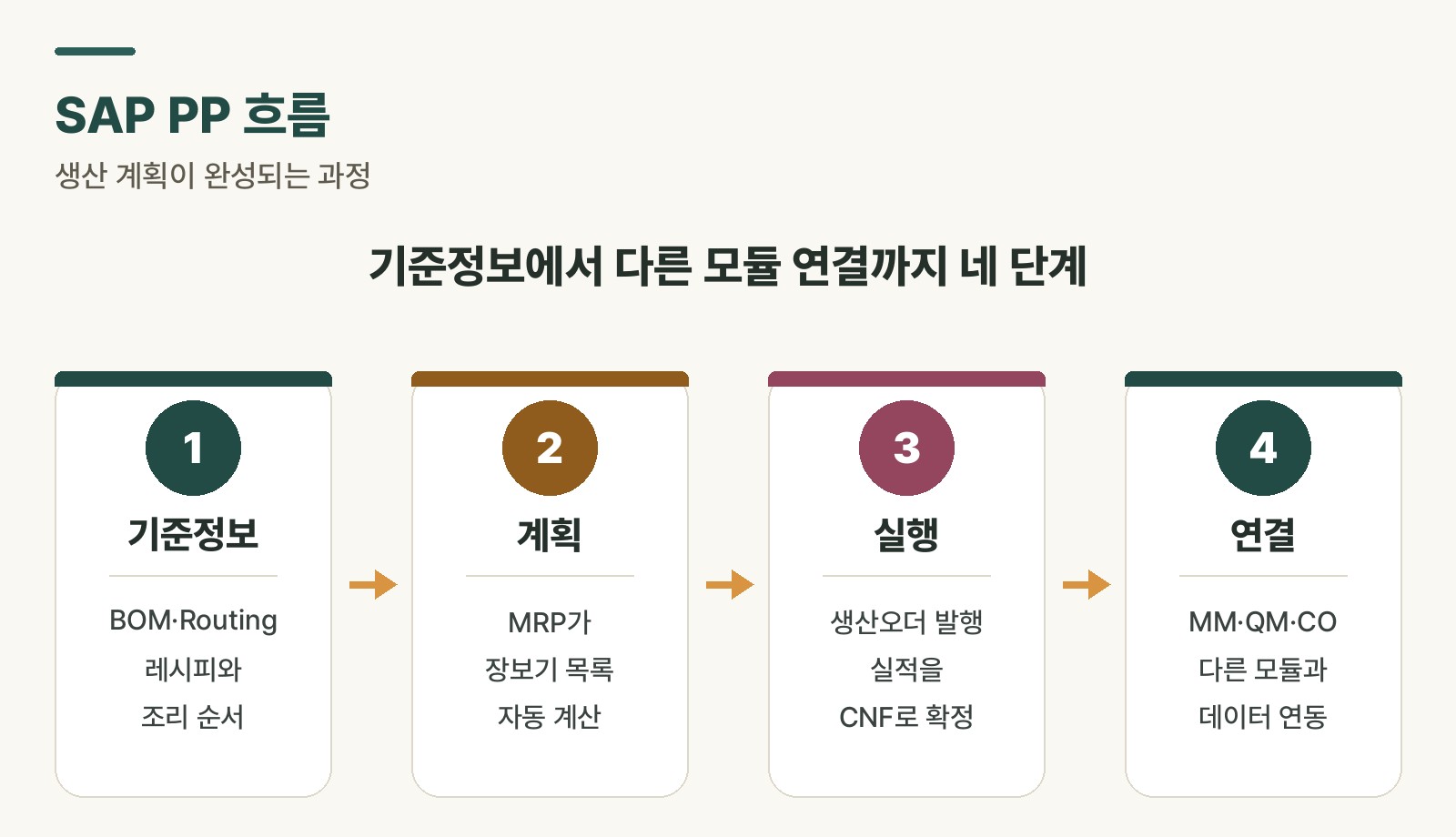 Figure 1. Overview of the SAP PP planning and execution flow
Modules PP connects to
PP doesn’t exist in isolation. It’s tightly connected to the modules around it.
- MM (Materials Management): When MRP results in a purchase requisition, it’s handed off to MM — this happens whenever a material needs to be bought externally.
- CO (Controlling): Based on CNF data, the actual cost of each production order gets calculated.
- MES: Collects shop-floor process results in real time and sends CNF data into SAP PP. Covered in more depth in the role of SAP MES.
Rabbit’s Takeaway
The first time you encounter SAP PP, terms like BOM, routing, MRP, production order, and CNF can feel like they’re floating around independently. But in reality, these concepts are all connected in a single flow.
Master data (BOM, routing) → MRP (planning) → production order (execution begins) → CNF (results confirmed) → goods receipt (completion)
In restaurant terms, this is exactly the same flow as writing the recipe and cooking sequence → planning how many servings to make today → starting the actual cooking → reporting that it’s done → serving the finished dish.
Once this flow settles into your head, no matter which screen you open in SAP, you’ll naturally be able to place it: “where in this flow does this screen sit?” 😎
Read more