
SAP Activity and CNF: reporting the kitchen log back to the head chef
Explains SAP PP's Activity and CNF/PCNF concepts through the flow of reporting kitchen results in a restaurant. Understand how execution results from MES get confirmed in SAP.
Hi, this is Rabbit! 🐰
The head chef has planned tonight’s menu: 50 servings of pasta, 30 servings of steak. Tasks are assigned to each cooking team, and a timeline is set. But what happens if, after the evening service, nobody records how many servings actually went out, how much of each ingredient was used, or which team finished at what time?
Inventory stops matching, costs can’t be calculated accurately, and tomorrow’s plan has no real basis.
Handling this “results reporting” as a system process is what SAP’s Activity and CNF (Confirmation) are for.
- Activity is an individual work step defined inside a production order — the task list the head chef hands out to each team.
- CNF is the confirmation signal that a task is done — the moment a cooking team reports “it’s ready.”
- Without CNF being reported properly, inventory, costs, and downstream planning all lose accuracy.
Activity: the work steps inside a production order
When a production order is released, the process sequence defined in the routing unfolds inside it exactly as designed. Each of these process steps is called an Activity in SAP.
In restaurant terms, when a production order for 50 servings of pasta is released, it contains an Activity list like this.
- Activity 1: Prepare sauce (work center: sauce team, standard time: 20 minutes)
- Activity 2: Cook pasta (work center: pasta team, standard time: 15 minutes)
- Activity 3: Plate the dish (work center: finishing team, standard time: 10 minutes)
Each Activity specifies which work center handles it, how long it should take, and what equipment is used. This is the work instruction the kitchen team receives.
MES: the container for shop-floor results
Activity defines “what needs to be done.” But how the work actually went on the floor has to be recorded separately.
On the shop floor, this role is usually handled by MES (Manufacturing Execution System). When workers clock in the start and end of a task, MES collects the actual time spent, quantity produced, and defective quantity in real time.
In restaurant terms, this is like the sauce team logging “sauce prep started, 6:00 PM” on the kitchen monitor when they begin, and “done at 6:22 PM, 50 servings produced” when they finish.
This results data flows from MES to SAP. The SAP MES interface serves as that connecting channel.
CNF: the moment results get confirmed in SAP
When results data from MES arrives in SAP, the Activity’s status changes.
==If the work is 100% complete, the Activity moves to CNF (Confirmed) status — the official stamp that both the planned quantity and time have been fully met.==
If only 70% of the plan was completed, the status becomes PCNF (Partially Confirmed). If the target was 50 servings of pasta but only 35 were finished, that’s PCNF.
| Status | Meaning | When it occurs |
|---|---|---|
| CNF | Fully confirmed | 100% of planned quantity completed |
| PCNF | Partially confirmed | Only part of the plan completed |
⚠️ Note: If a PCNF status is still open when the production order closes, the remaining quantity is treated as incomplete. Even if the work was actually finished on the floor, it stays PCNF unless it’s reported in the system. Accumulated reporting gaps throw off inventory and cost figures significantly.
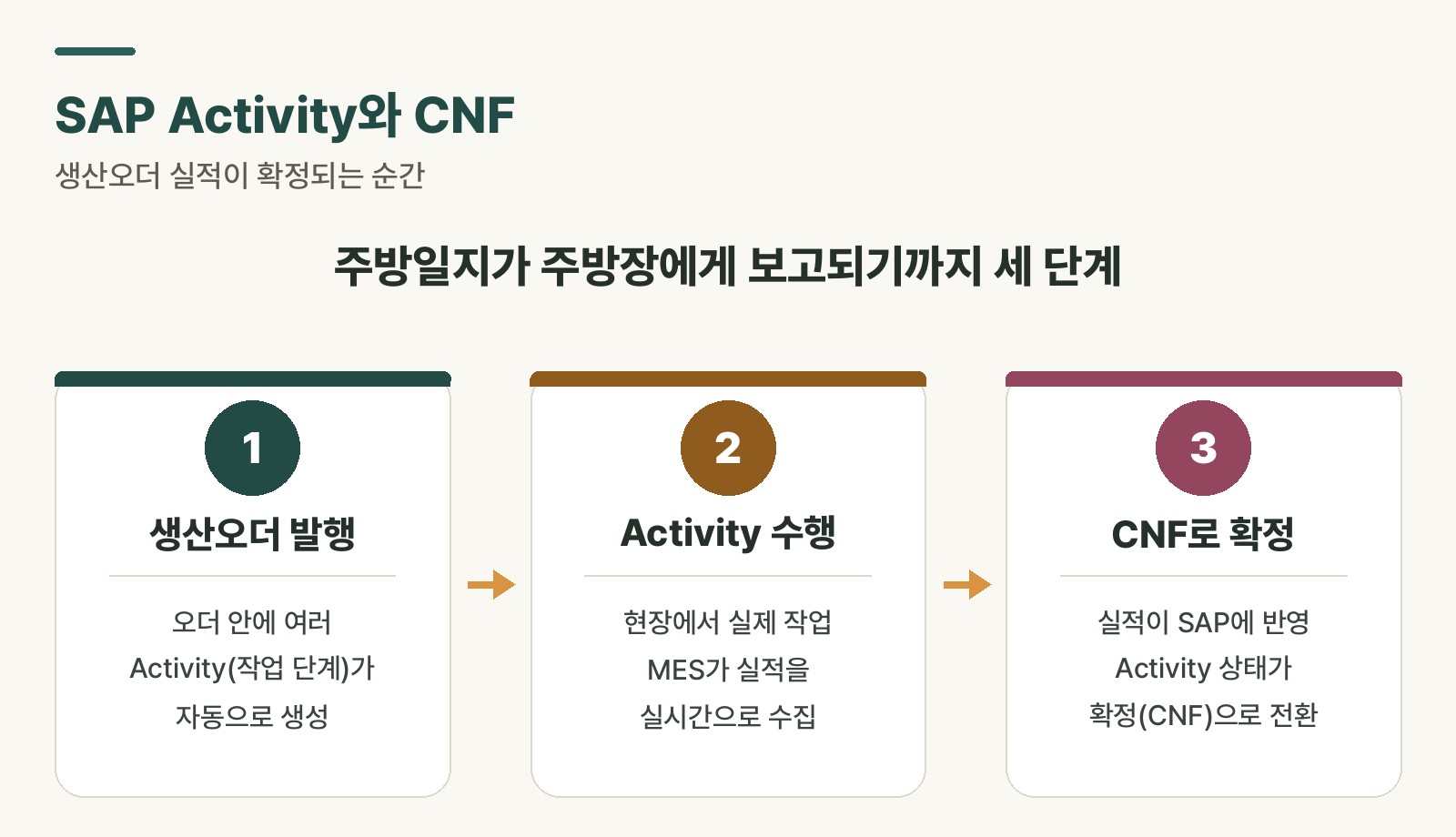 Figure 1. The results-confirmation flow from Activity to CNF
Two reasons CNF matters
First, it’s the basis for cost calculation.
Once an Activity is confirmed (CNF), the time and resources spent on that task become final. SAP’s CO (Controlling) module calculates the actual cost per production order based on this data. This is where numbers like “labor cost X, equipment cost Y for making 50 servings of pasta” come from.
💡 Key point: Without CNF, costs remain nothing more than planned figures. Cost variance analysis — comparing actual input against plan — is only meaningful once CNF data exists.
Second, it’s a signal for the next process step.
Only once Activity 1 (sauce prep) is confirmed does the system recognize that “Activity 2 (cooking pasta) can begin.” If downstream steps proceed without a signal that the preceding step is done, plan and actuals get tangled.
Entering CNF manually without MES
In environments without MES, floor staff enter CNF directly in SAP, using T-codes CO11N (production order confirmation) or CO15 (final confirmation).
There are three main entry items.
- Actual production quantity: what was actually completed versus planned
- Actual time spent: how long the task actually took
- Defective quantity: the number of defective units from the process
The weakness of manual entry is the lack of real-time visibility. SAP can’t tell how far along a task is while it’s in progress — the status only changes when someone actually enters it. This is exactly why larger shop floors or more complex processes often consider adopting MES.
Whichever method is used, what matters most is the accuracy of CNF data. Careless entry or batching it all at once distorts cost calculations and throws off the next MRP run.
Rabbit’s Takeaway
Activity and CNF are simple concepts on their own — a “to-do list” and a “completion report.”
But in practice, this often breaks down. When the floor gets busy, CNF entry falls behind. People end up entering a whole day’s worth at once in the evening, or skip it entirely. When that happens, the production order status in SAP and the actual progress on the floor drift apart.
If timely CNF entry doesn’t become a habit, inventory accuracy and cost reliability break down together. That’s exactly why it’s worth spending time early in a system rollout to walk floor staff through this flow thoroughly. 😎
Read more