
SAP production order numbers: what happens when all 12 digits run out
Why SAP production order numbers are never reused, why they're unique at the client level, and what happens when a number range runs out, explained through the analogy of a bank's ticket-number dispenser.
Hi, this is Rabbit! 🐰
Picture the ticket dispenser at a bank counter. A customer pulls ticket number 25 and says, “I’ll come back later,” then leaves. Does the next person get to pull number 25 again? No. The machine will only ever dispense number 26 next.
SAP production order numbers work exactly the same way. Once a production order number has been issued, it is never reused, even if the order is deleted.
- Deleting a production order doesn’t free up its number for reuse — it just gets flagged as deleted.
- Numbers can never be duplicated within the same client, even across different companies or plants.
- When a number range runs out, the digit count doesn’t automatically expand, so it needs to be managed proactively.
Why deleted numbers can’t be reused
“Deleting” a production order in SAP doesn’t erase the data entirely. It attaches a delete flag to the order, marking it as “no longer in use.”
The moment an order is created, its number gets recorded in the system’s history. Even after the order is later deleted, a trace of the number itself remains, so that same number can never be assigned to a new order.
Think of it like a restaurant reservation number. If reservation #1047 cancels today, the next guest doesn’t get assigned #1047 again. The cancellation record stays on file, and the next guest gets #1048.
This principle matters for auditing. Because numbers are never reused, you can always trace when and why a specific numbered order was created and how it was processed. That traceability is essential for financial audits and quality history tracking.
Numbers are unique at the client level
Production order numbers can never be duplicated within the same SAP client, even across different company codes or plants (factories).
The reason lies in the structure of AUFK, the production order master table. In this table, the only key field that uniquely identifies an order is the order number (AUFNR). Company code (BUKRS) and plant (WERKS) are just supporting attributes, not part of the key.
For example, if production order number 10000001 was created at plant A, plant B can never use that same number.
Because of this, when multiple plants run on a single SAP system, number ranges are typically split and assigned by plant from the start. Setting plant A to use the 10-million range and plant B to use the 20-million range, for instance, prevents collisions.
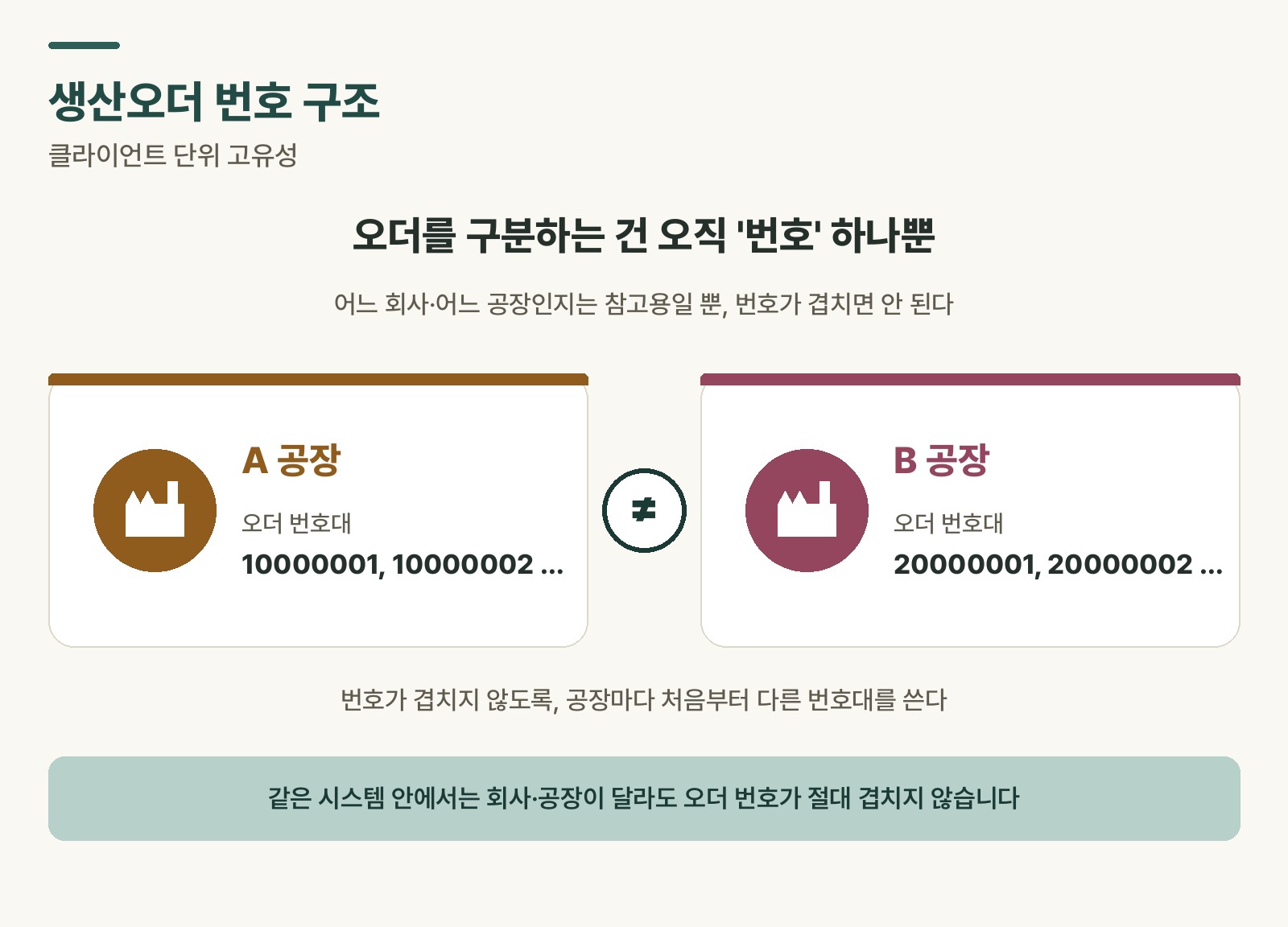 Figure 1. Client-level uniqueness and number range separation by plant
What happens when a number range runs out
A number range is a block reserved in advance in SAP configuration. If it’s set to, say, “10000000 to 99999999,” numbers are only ever issued within that block.
⚠️ Note: Once order number 99999999 is issued, the system can’t generate a new number and throws an error. The digit count doesn’t automatically expand to 9 digits. The number range has to be extended, or a new range added, by a system administrator ahead of time.
Expanding the digit count from 8 to 12 digits increases the available numbers to roughly one trillion. Even issuing a million orders a year, it would take hundreds of thousands of years to exhaust a 12-digit range. In practice, running out of numbers is almost never a real concern, but the range configuration itself still needs to be set up carefully at the start of implementation.
Checking order volume with SE11
If you want to check how many production orders have accumulated in your system, use T-code SE11.
Looking up the database table AUFK in SE11 (ABAP Dictionary) shows the full set of production order master information. Clicking the “number of entries” button shows the total order count, and specifying a date range on the creation date (ERDAT) field shows the order count for a specific period.
If a field name in AUFK looks unfamiliar, place your cursor on it and press F1 to bring up an explanation of that field.
Checking the order count also gives you a sense of how much headroom is left before the number range runs out. For example, if you’re on an 8-digit range and already at 60 million, it’s probably time to ask an administrator about extending the range.
Regular users often don’t have SE11 access. If you need to check order volume, ask an IT admin or a colleague with the right authorization, or use one of the display-only T-codes listed in SAP PP T-codes.
💡 Key point:
AUFNRis the order number,AUARTis the order type,ERDATis the creation date, andWERKSis the plant. Knowing just these four fields is enough to quickly find the order you’re looking for in AUFK.
The T-code for number range configuration
Production order number ranges can be checked and managed through T-code OPJK. This screen shows which number ranges are configured for each order type, and how far the current number has progressed.
Note that OPJK is a system configuration screen, so regular user authorization often won’t allow access. If you need to know whether a number range is close to running out, ask an IT admin or system administrator. Any number range expansion should always be tested in the development and quality environments before being applied in production.
Rabbit’s Takeaway
Production order numbering doesn’t behave the way intuition suggests it would — most people assume deleted numbers get reused. Once you know that a deleted number is preserved as a record rather than permanently erased, and that numbers can never collide within the same client even across different companies, a lot of questions that come up in practice resolve themselves naturally.
Number range management isn’t something you touch often in daily work, but if the system suddenly can’t create a new order, it’s worth remembering that a depleted number range could be the cause — that recollection makes diagnosing the problem much faster. 😎
Read more