
SAP MRP no planned order created: the prep station stays empty
Five reasons MRP can run without generating a single planned order, walked through in the order you should check them.
Hi, this is Rabbit! 🐰
Before closing up for the night, it’s the manager’s job to pull tomorrow’s ingredients ahead of time and set them out on the prep station, so they’re ready to hit the burner first thing in the morning. Tonight, though, the prep station is empty. Nothing’s been set out for tomorrow at all.
No need to panic. There may simply have been nothing to prep. If yesterday’s batch is still around, or no orders are coming in tomorrow in the first place, an empty prep station is actually the right outcome.
MRP works the same way. If you run it and not a single planned order comes out, it’s usually not MRP breaking down — it’s MRP finding no reason to make anything. Today, let’s walk through five reasons why, in the order you’d want to check them.
- MRP not generating a planned order usually isn’t an error — it’s often just the honest result of “nothing needs to be made.”
- The cause tends to fall into five buckets: no requirement, covered by stock, missing BOM, different procurement type, or the material isn’t an MRP target at all.
- Start with the stock/requirements list (
MD04). Look at the outcome first, then narrow down the cause.
Start with MD04
Before hunting for the cause, look at the result. Open MD04 (the stock/requirements list) to check the material’s current state — that’s the first step.
This screen lists the material’s stock and all upcoming receipts and issues in chronological order. Current stock sits at the top, and requirements and expected receipts stack below it by date, with the running balance calculated line by line. If a planned order exists, it shows up here as a PldOrd entry.
From here, the path splits two ways. If there’s no requirement line at all, there was nothing to calculate against. If a requirement shows up but no planned order does, something else is going on. Check the five items below, in order.
1. No order came in to begin with
This is the most common case. It’s not that the manager failed to calculate anything — there was nothing to calculate for.
MRP only moves when there’s demand. A sales order, a planned independent requirement (PIR), a dependent requirement passed down from a parent material — something has to say “this much is needed” before the calculation flows downstream. If MD04 shows zero requirement lines, this is where it stopped.
In make-to-stock (MTS) environments especially, it’s common for the PIR simply not to have been entered for this period, or for it to have been entered but with a planning period that’s already passed. Even if last month’s plan is still sitting on the screen, MRP won’t re-plan a date that’s already gone by.
In make-to-order (MTO) environments, the sales order plays that role instead. If a sales order exists but isn’t showing up as a requirement, you’d need to check the requirement transfer setting on the order item — that’s a deep enough topic for its own post.
2. There’s already a finished batch on hand
If the order came in but the prep station is empty, the manager probably checked the fridge first. If yesterday’s batch is still sitting there, there’s no reason to pull ingredients and prep it all over again today.
MRP calculates against net requirement the same way. Gross requirement is “the total amount needed this time,” before accounting for stock. Net requirement is gross requirement minus what’s already on hand — “the amount that actually still needs to be sourced.” If net requirement comes out to zero or less — meaning what you already have is equal to or more than what’s needed — no planned order gets created. That’s not an error; it’s the calculation honestly landing on zero. This calculation is walked through with an example in SAP MRP: planning materials like a restaurant prepping a big group order.
One thing to watch for: the “stock” here can differ from what you’d see with your own eyes. Even if the warehouse looks full, material sitting in quality inspection or on hold gets excluded from available stock. Conversely, if a purchase order or planned order is already in the system as an expected future receipt, it gets deducted from net requirement in advance — even though the physical goods haven’t arrived yet. Since it’s confirmed to be coming, MRP treats it as already covered.
💡 Key point: Walking through how stock and requirements net out, line by line, in
MD04explains most of the “why didn’t this show up” cases right there on the screen.
3. The recipe doesn’t call for the ingredient
This is when a planned order for the finished good exists, but the requirement never flows down to a component material. In kitchen terms: the instruction “100 servings of kimchi stew” is posted, but the recipe doesn’t list napa cabbage, so there’s no instruction anywhere to prep it.
Either the BOM doesn’t exist at all, or it does but the validity date doesn’t line up, so the requirement never explodes down through it. BOMs carry a valid-from date, and if the planned production date falls before that, the system treats the BOM as if it doesn’t exist. Open the BOM with CS03 to check the validity date and the components.
If the environment uses production versions, there’s one more layer. Even if both the BOM and the routing exist independently, MRP can’t decide which recipe to use unless a production version ties them together and is itself valid. The relationship between these four master data objects is covered in SAP PP master data, understood through four essentials.
4. This one’s meant to be bought, not made
If a planned order didn’t show up but a purchase requisition did, that’s not a problem — that’s the setting doing exactly what it’s set to do.
The procurement type on the material master’s MRP view decides whether to make it in-house or buy it in. In-house production generates a planned order; external procurement generates a purchase requisition. It’s the same split as a stock made in-house versus a finished sauce bought ready-made.
If the setting allows both, the special procurement type determines which way it goes. If an in-house material is generating a purchase requisition instead of a planned order, this field being set differently than intended is usually the reason.
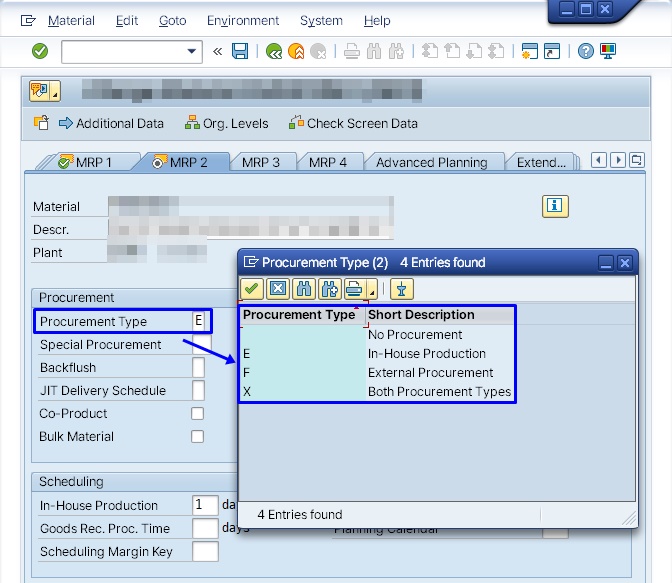 Figure 1. Procurement type setting on the material master’s MRP view
5. This material was never meant to be planned
Finally, the material may not have been a calculation target in the first place.
Open the material master with MM03 — if there’s no MRP view at all for that plant, MRP skips the material entirely. It happens more often than you’d think: a new material gets registered with only the basic views filled in, and the MRP view is missed.
If the MRP view exists, the next thing to check is the MRP type. Materials meant to be planned generally carry PD (MRP). If this value is different, the material drops out of the calculation — and in practice, two values come up most often.
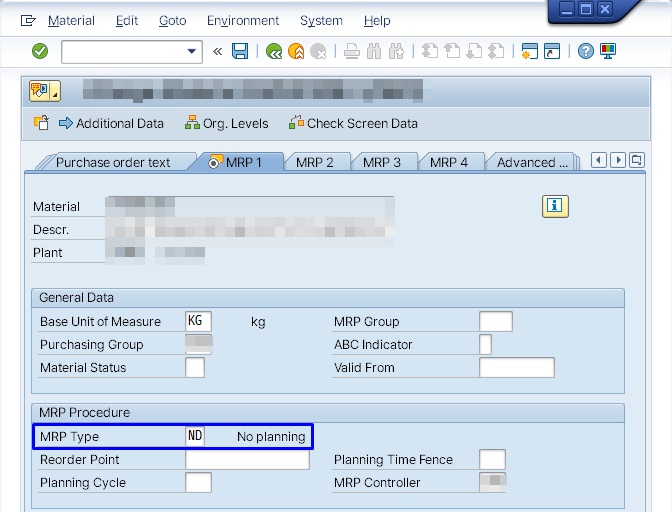 Figure 2. MRP type
 ND — no planning
ND (no planning) does exactly what it says: this material won’t be planned at all. It’s used for consumables or materials managed manually. With this set, no planned order gets created no matter how much requirement exists.
X0 (no MRP, BOM explosion) is a bit trickier. The material itself is excluded from planning, but its BOM still explodes. So this material never gets a planned order, while requirements still flow down to its components as normal. In kitchen terms, it’s an instruction that says “don’t plan this semi-finished item on its own, but do calculate what goes into it.”
If everything downstream shows up except this one item, X0 is worth suspecting. If the setting is intentional, this is normal behavior; if it got set unintentionally, this is your cause.
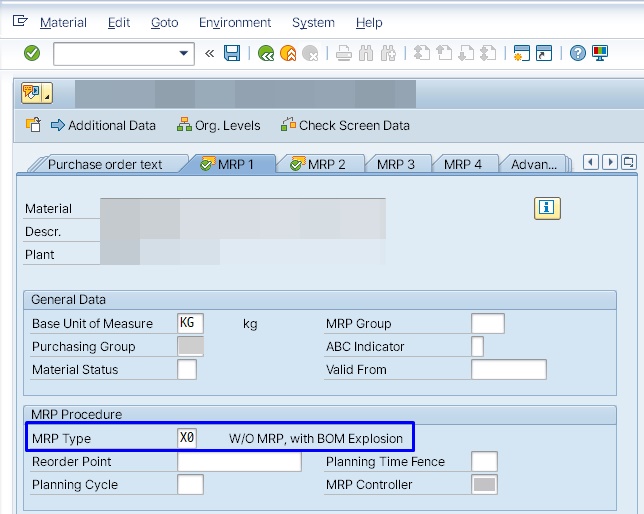 Figure 3. MRP type
 X0 — no MRP, BOM explosion included
⚠️ Note: The MRP type and procurement type values shown here follow SAP standard defaults. Many companies add custom types, so check against your actual system’s dropdown values.
Rabbit’s Takeaway
When MRP doesn’t produce a planned order, it’s usually not that the calculation failed — it’s that the calculation concluded “nothing needs to be made.” So instead of re-running MRP, it’s faster to retrace what was fed into it.
It’s the same as checking the order, the recipe, and the fridge instead of scolding the manager for not restocking the prep station. MRP isn’t a system that manufactures answers — it’s a system that faithfully calculates and shows you whatever you fed into it. 😎
Read more