
SAP batch jobs: the kitchen's automated overnight settlement system
Explains what an SAP batch job is, how to set it up and monitor it with T-codes SM36 and SM37, and how business users, PI, and developers collaborate on it in practice.
Hi, this is Rabbit! 🐰
It’s 11 PM, the restaurant has closed, and the kitchen is empty. Yet at 2 AM, today’s inventory gets tallied automatically, tomorrow’s ingredient order list gets generated, and a weekly sales report lands in the owner’s inbox.
Nobody comes in at 2 AM to do this by hand. It was scheduled ahead of time: “run this task every day at 2 AM.”
This is exactly what SAP’s batch job is — a scheduled task that runs automatically at a set time without anyone pressing a button.
- A batch job schedules a recurring task to run automatically at a set time.
- You schedule it with
SM36and monitor the execution results withSM37. - Setup is a collaboration: business user request → PI designs the conditions → developer registers it.
When you need a batch job
There are recurring tasks that would otherwise need to be done manually every day. For example:
- Updating exchange rates in SAP every morning
- Aggregating weekly production results every Friday evening and emailing them to the responsible person
- Running month-end inventory closing at midnight on the last day of the month
- Running MRP automatically every night
What happens if someone has to run these manually every time? Days get missed, nothing gets processed on weekends and holidays when no one’s around, and mistakes creep in.
A batch job solves this. Once scheduled, the system runs it whether the responsible person is there or not, whether it’s a weekend, or the middle of the night.
In restaurant terms: instead of the owner coming in at 6 AM to tally yesterday’s inventory and draft today’s purchase order, the tally finishes automatically overnight and a draft order is ready by the time the owner arrives in the morning. This overnight automation is the batch job.
SM36: scheduling a batch job
The T-code for creating a batch job is SM36. Here you define “what program runs, when, and under what conditions.”
There are three main things to configure.
Program to run: which report or program in SAP to execute — for example, the MRP run program or an inventory aggregation program.
Start time and recurrence: when it first runs, and the recurrence pattern afterward (daily, every Monday, last day of the month, etc.).
Execution conditions (variant): the parameters applied when the program runs — which plant’s inventory to aggregate, what period to cover, and similar conditions.
💡 Key point: If the variant is set up wrong, the batch job processes the wrong scope of data. Before registering in SM36, it’s important to run the program manually first to confirm the variant is correct.
SM37: monitoring execution results
After a batch job runs, you need to check the results. T-code SM37 is the batch job status board.
In SM37, you can see the status of a batch job.
- Finished: completed normally
- Cancelled: stopped due to an error
- Active: currently running
- Scheduled: not yet reached its run time
If there’s an error, you can click into that batch job to check the log. Since the log records which step failed and why, you can trace the root cause.
In practice, checking batch job monitoring every morning before starting work is standard. Confirm that the batch jobs run overnight completed normally first, and handle any errors before the day’s work begins.
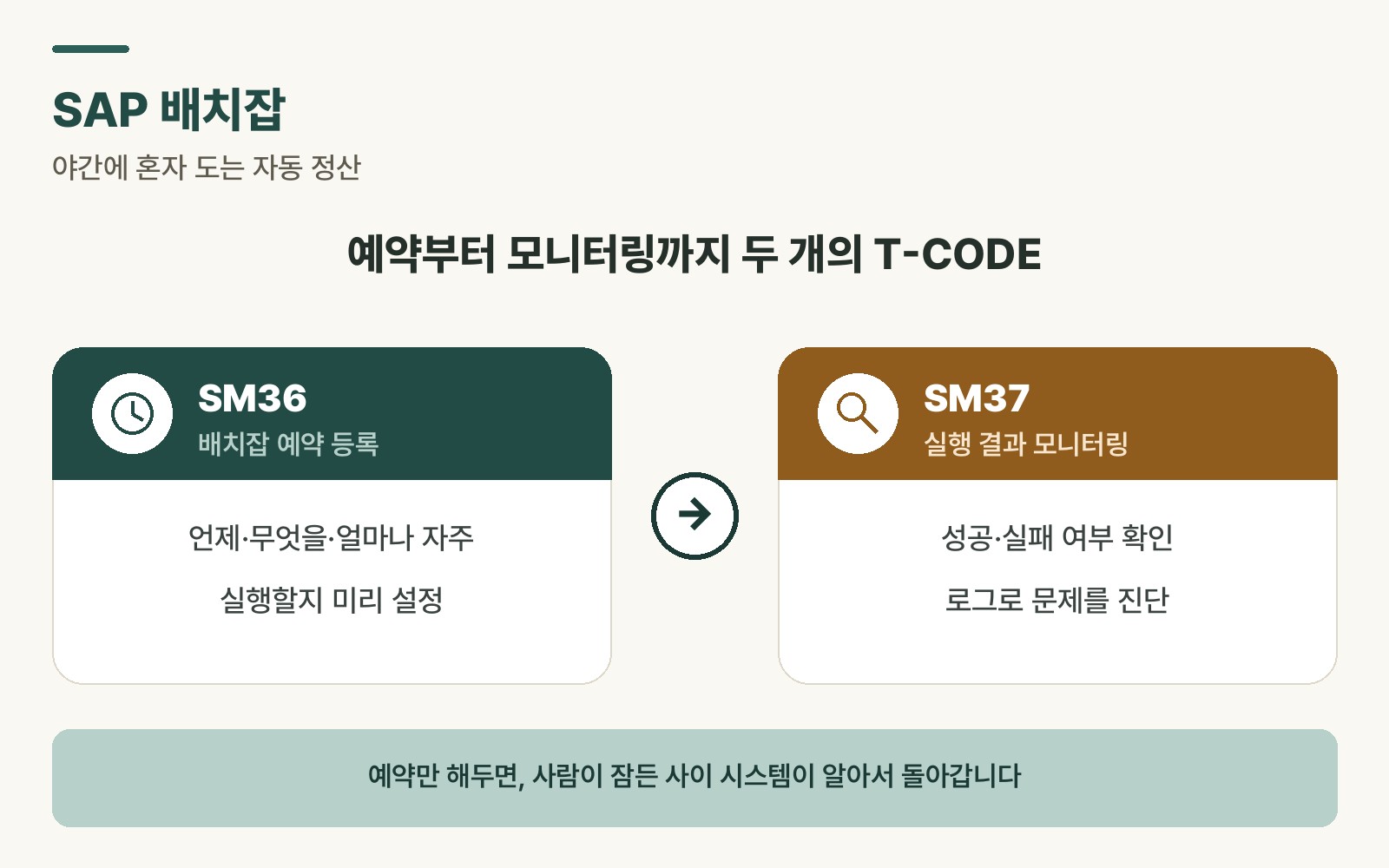 Figure 1. The batch job flow from SM36 scheduling to SM37 results monitoring
Collaboration in practice: who builds it, who manages it
Typically three roles collaborate to build a single batch job.
Business user: raises the need and requirements for the batch job. “Every Friday at 7 PM, aggregate this week’s production results and email them to our team lead.” They communicate specifically what data, when, and in what format they want it.
PI person: translates the business user’s requirements into system design language — which program to use, what conditions go into the variant, what the run cycle should be — and documents this as a specification. This spec goes to the developer.
Developer: builds a program per the spec, or uses an existing program, and registers the batch job in SM36. After registering, they run a test to confirm it works correctly.
Once a batch job goes into operation, ongoing monitoring is often handled by the PI person or a business-side manager. They check SM37 daily and notify the developer to take action when errors occur.
Advantages and cautions
Advantages: it runs precisely on schedule without anyone present. Work continues overnight and on weekends. It’s more consistent and less error-prone than manual execution.
Cautions: a mistake in the variant conditions can quietly cause a big problem. If a batch job runs against data it shouldn’t have touched, no one notices until it’s finished.
Also, if an error occurs overnight, nobody knows until the next morning. Skip checking SM37 the next day, and an important job could sit failed all night without anyone realizing.
⚠️ Note: Before registering a batch job in the production environment (PRD), it must be thoroughly tested in the development or quality environment (DEV/QAS). Batch jobs that process large volumes of data or perform deletion/closing tasks in particular should never go live without testing.
Rabbit’s Takeaway
Once set up well, a batch job is a quiet convenience that keeps work running even when nobody’s around to do it manually. Ironically, though, it has no presence when things go well, and only becomes noticeable when something goes wrong.
The real value of a batch job isn’t “running smoothly” — it’s “catching problems quickly when they occur.” Making a daily SM37 check part of your morning routine is the single most important habit for anyone running batch jobs. 😎
Read more