
SAP production order TECO: when to take the pot off the burner
When to trigger TECO on a production order, and what gets cleared versus what stays behind when you close it out with quantity still remaining.
Hi, this is Rabbit! 🐰
Out of 100 bowls ordered, 92 went out. The remaining 8 couldn’t be made — ran short on ingredients — and the customer has already left. How long should this pot stay on the burner?
Leave it there, and there’s no burner free for the next order, with nothing anywhere in the kitchen marking this ticket as done. But clear it away without any wrap-up, and nobody can tell where the leftover ingredients went.
TECO (Technical Completion) on a production order is the move that takes the pot off the burner. The SAP production order status codes: the order in which a dish comes together post introduced TECO as the final stage, but in practice, what actually trips people up isn’t “what TECO is” — it’s when to trigger it, and what’s left behind once you do. That’s what we’re covering today.
- TECO declares “no more production on this order” — it doesn’t mean the cost side is settled.
- Triggering TECO clears out open reservations and remaining capacity requirements, dropping them from MRP and capacity planning.
- TECO and settlement/closure (CLSD) are separate stages. Mix up the order, and cost stays stuck on the order.
What TECO actually does
TECO tells the system that no further production activity will happen on this order. Looking at exactly what changes makes the behavior clear.
Triggering TECO deletes any reservation for materials not yet issued. The “8 bowls’ worth of ingredients still scheduled to go out” reservation, left over after issuing for 92, disappears. At the same time, remaining capacity requirements held at the work center are cleared too — the burner gets freed up, in effect.
Why this matters: as long as that reservation and capacity requirement stay alive, MRP and capacity planning keep treating them as real demand. Material gets ordered and a work center shows as booked for 8 bowls nobody intends to make. TECO is the move that clears out that phantom demand.
On the flip side, TECO does not clear cost that’s already been incurred. The material and labor cost poured into making those 92 bowls stays sitting on the order until settlement. This is where the misunderstanding usually happens.
💡 Key point: TECO closes out production, not cost. Treat the two as the same thing, and you won’t be able to explain why cost is still sitting on the order at month-end.
When to trigger it
If all 100 bowls got made normally and receipt is done, the order flows naturally from DLV into TECO. Judgment is needed for the cases that don’t go that smoothly.
When you’ve decided to give up on the remainder. Like the 8 bowls above — if you’ve confirmed you won’t be making the rest, this order is a TECO candidate. It’s safer to mark Final Confirmation on the confirmation screen at the same time, so it’s clearly on record that this operation is done.
When the order was created by mistake. An order that’s already had materials issued or confirmations posted against it can’t be deleted. Lock it down with TECO instead, and reverse the misdirected materials with a reversal (posting the same movement in the opposite direction to undo an already-confirmed goods issue or receipt).
When month-end close hits. This is where judgment calls get the trickiest. If you hit close with only 70 of 100 bowls made, the first thing to decide is what happens to the remaining 30.
If there’s no intention to keep making them on this order, close it with TECO as covered in this post and issue a fresh order for the remainder. But if the plan is to keep making them on the same order, don’t trigger TECO. Leave that order open and carry only the incomplete cost over to a work-in-process (WIP) account instead. The two approaches are compared in SAP production order carryover: handling half-finished food at month-end close.
What’s still left after TECO
Even after TECO, things remain unresolved on the order. Knowing this in advance keeps month-end from being a surprise.
Cost incurred. As mentioned — material and labor cost only moves to the cost object once order settlement runs. Once settlement completes, the order picks up SETC status.
Variance. The gap between planned cost and actual cost gets calculated during settlement. If only 92 bowls came out but materials for 100 went in, that variance shows up here.
Uncleared WIP. Any amount sitting as work-in-process also gets cleared out at settlement. How the value of food still cooking gets handled is covered in SAP WIP: the value of a dish that hasn’t hit the plate yet.
So the actual sequence runs like this: TECO (production ends) → settlement (cost ends) → CLSD (order closes). CLSD is the final state that fully closes out an order once cost has been fully settled — it won’t attach to an order where settlement hasn’t finished.
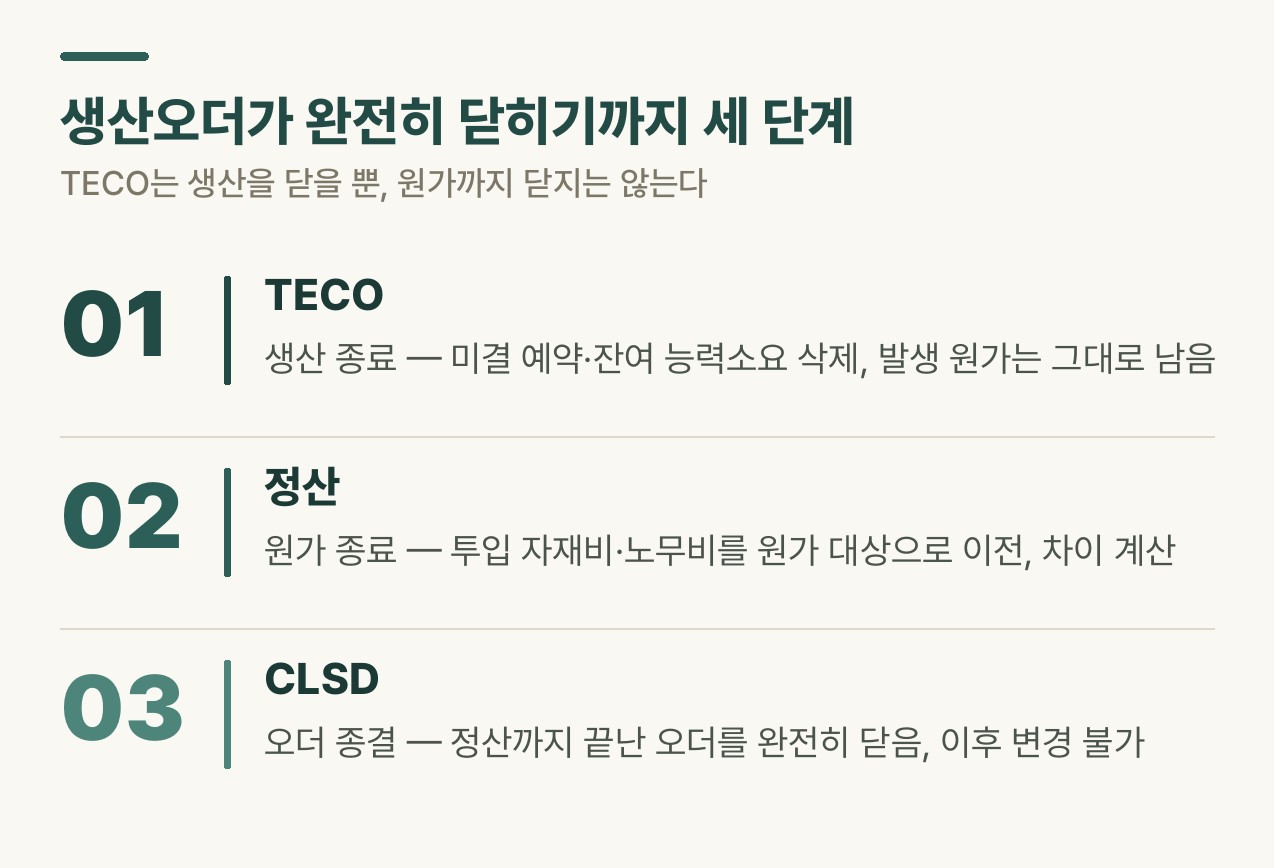 Figure 1. Three steps to fully close a production order
Undoing it
Fortunately, TECO can be reversed. Open the order in CO02 and go to Functions → Restrict Processing → Revoke Technical Completion to undo it — it sits directly below the Restrict Processing → Technically Complete menu used to trigger TECO in the first place.
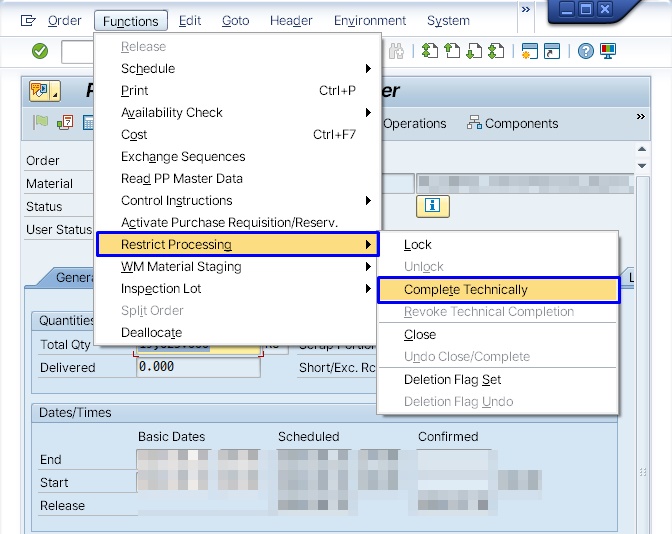 Figure 2. CO02 Functions menu — TECO and its reversal under Restrict Processing
That said, deleted reservations don’t come back automatically. You can put the pot back on the burner, but the ingredients you already cleared away don’t reappear on their own. After reversing TECO, check CO03 to confirm the material reservations and capacity requirements were restored as intended.
Orders that have already reached CLSD are one layer more involved. CLSD has to be reversed first, then TECO — and reversing a settled order also has downstream effects on cost. So CLSD only gets triggered on orders that are truly finished.
⚠️ Note: The status codes and transaction codes shown here follow SAP standard defaults. Some companies restrict TECO authorization to specific roles or require a separate approval step, so check your actual operating rules alongside this.
Rabbit’s Takeaway
TECO trips people up because it looks like “the end.” It sits last in the list of status codes, and its name even says complete.
But TECO is the end of production, not the end of the order. Taking the pot off the burner and closing out the day’s ingredient cost in the books are two different things. Because the person who closes out production and the person who closes out cost aren’t the same, assuming TECO wraps everything up leaves you with a mystery balance at month-end. 😎
Read more